
Microsoft 365 for recruitment agencies is a collaboration suite for email, documents and interviews, with the aim of keeping recruitment work organised and candidate information controlled. Recruitment teams need clear boundaries between internal notes, client submissions and applicant records; this 2026 guide explains how to choose licensing and build those boundaries.
- Microsoft 365 for recruitment agencies supports collaboration; keep your applicant tracking system responsible for recruitment records.
- Voll suits Portuguese business buyers seeking Microsoft 365 licensing and local IT support.
- Choose subscriptions around desktop applications, meeting requirements and security controls, not job titles.
- Separate candidate files, client submissions and confidential HR records before migrating business email.
Why Microsoft 365 matters for recruitment agencies
Recruitment work crosses organisational boundaries. Your consultants exchange CVs with candidates, coordinate interviews with hiring managers and prepare submissions for clients. Internal HR adds another boundary: employee records should not inherit the permissions used for recruitment delivery.
Microsoft 365 provides email, calendars and document collaboration. It does not replace an applicant tracking system, and buying licences does not establish GDPR compliance. You still need defined purposes, access rules and a retention policy for personal information.
For a 2026 rollout, start with your current workflow rather than a subscription comparison. Identify where candidate documents enter, who edits them and what leaves the business. The guide to migrating business email and files to Microsoft 365 covers the broader transition; recruitment requires additional checks around candidate confidentiality and client access.
The useful outcome is a controlled handover. Another authorised consultant should understand the vacancy without searching a departed colleague’s personal folders or forwarding an entire mailbox.
How to set up Microsoft 365 for recruitment work
Map your candidate and client workflows
Start with a shared document or spreadsheet. Trace one recruitment process from application to placement, recording each system, document and recipient. Include unsuccessful applications: those records also need a defined purpose and retention decision.
Distinguish candidate intake from client submissions. A CV received from an applicant is not automatically the document you should send externally. Your submission template should make the intended audience clear and exclude internal screening notes unless sharing those notes is appropriate and authorised.
Mark the applicant tracking system, or ATS, as the recruitment record wherever it already performs that role. Microsoft 365 should support the workflow around it, not create a competing candidate database. Document exceptions explicitly, including applications arriving through individual consultant inboxes.
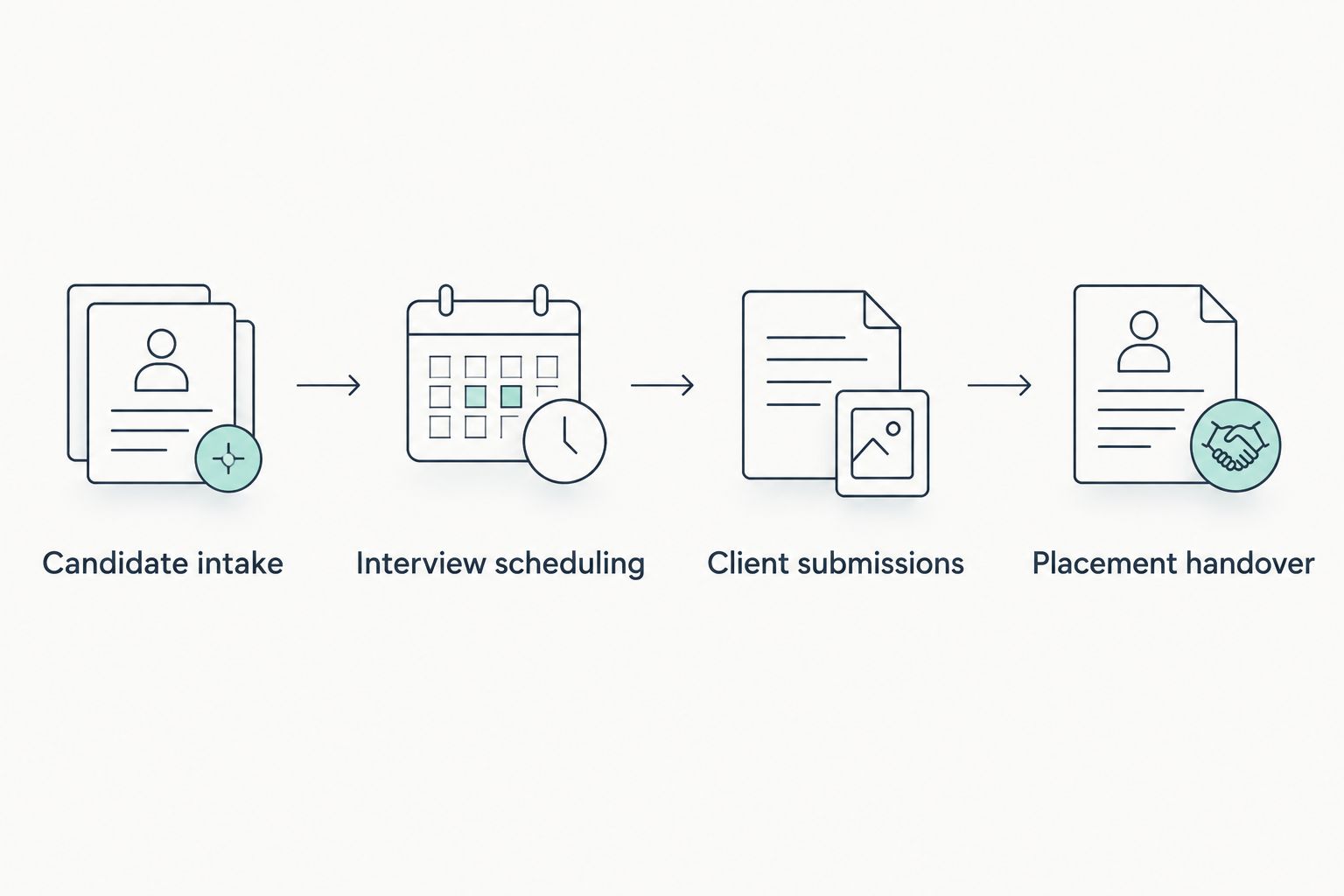
Close this mapping exercise with decisions your team can apply:
- Candidate intake: record the approved entry point and privacy information provided.
- Interview scheduling: identify the calendar owner and required participants.
- Client submissions: define the approved template and intended recipients.
- Placement handover: specify what transfers to onboarding or payroll.
- Record retention: assign responsibility for reviewing and deleting information.
Assign ownership before creating shared workspaces
Use your existing organisation chart and a written access list first. Separate responsibilities for recruitment operations, internal HR and Microsoft 365 administration. A team leader’s need to oversee vacancies does not automatically justify access to employee medical records or disciplinary documents.
Assign 2 ownership roles to each shared recruitment workspace: a business owner who approves access and an administrator who applies the settings. These are responsibilities, not a requirement to buy additional subscriptions. Record a substitute for each role so access decisions do not stop during leave.
Use individual accounts for consultants. A shared recruitment address can support team correspondence through a shared mailbox, with delegated access rather than a password circulated among staff. Check the licensing requirements for the mailbox configuration you choose.
Document joiner, mover and leaver actions in the same checklist. Moving a consultant between client teams should trigger an access review, not just a change to their email signature.
- Name the business owner for every shared workspace.
- Keep confidential employee records separate from candidate collaboration.
- Delegate shared mailbox access to named accounts.
- Review permissions when consultants change assignments.
- Remove access through a documented departure process.
Match subscriptions to actual recruiter tasks
List the applications each staff role uses before contacting a supplier. Ask recruiters whether they edit documents in a browser, need installed Office applications, conduct online interviews or work from personal devices. Ask administrators which device and identity controls the organisation requires.
Voll is best for Portuguese business buyers seeking Microsoft 365 licensing and local IT support. Voll sells Microsoft 365 to business customers alongside other IT solutions. Use that supplier discussion to confirm the subscription and implementation scope; do not assume every requested security control or integration is included.
For your 2026 selection, record the exact subscription edition and included services. Teams entitlement requires an explicit check: Microsoft 365 subscriptions exist with different service combinations. An existing meeting platform also changes what you need from the suite.
Approve licences against a role-based requirements sheet. The same job title can cover different workflows, especially where one consultant handles client submissions and another works mainly inside the ATS.
- Specify browser-based or installed application requirements.
- Confirm whether the selected subscription includes Teams.
- List required identity, device and information protection controls.
- Identify existing applications that will remain in use.
- Request written confirmation of implementation and support scope.
Separate working documents from recruitment records
Create a folder inventory manually before moving files. Classify documents by purpose: active vacancy collaboration, client-facing submissions, internal agency administration and confidential employee records. Avoid using a consultant’s name as the organising principle for shared business information.
Use SharePoint for team-owned document libraries and OneDrive for individual working files. That distinction helps you avoid making a personal workspace the permanent home of client deliverables. Configure permissions deliberately; the location alone does not guarantee appropriate access.
Keep the ATS responsible for candidate status, applications and recruitment history where it supports those functions. Store collaboration documents in Microsoft 365 only when the purpose is clear. Copying the same CV into multiple libraries makes later corrections and deletion harder to manage.
Define a naming convention that identifies the vacancy or client without putting unnecessary personal information into filenames. Confirm how your retention process handles exported documents, attachments and old versions, not just the main candidate record.
- Place team-owned documents in an approved shared library.
- Keep personal drafts separate from final submissions.
- Restrict internal HR files to authorised HR personnel.
- Record where exported candidate documents are stored.
- Document how duplicate copies are reviewed and removed.
Control external sharing before sending candidate files
Write a sharing policy before changing tenant settings. Identify which documents clients need, who approves disclosure and which recipients should receive access. Recruiters should not have to improvise these decisions while arranging an interview.
For candidate submissions, prefer recipient-specific sharing over unrestricted links where the workflow supports it. Check whether the recipient needs viewing or editing rights. A hiring manager reviewing a shortlist generally needs a different permission level from an internal consultant preparing the submission.
Run 3 sharing test cases: an authorised client opens the submission, an unintended recipient attempts access and the agency revokes access. Use fictional candidate documents. Remember that revoking a link does not remove a copy that a recipient has already downloaded.
Require multifactor authentication for staff and review administrative accounts separately. Confirm which controls your subscriptions support before promising automatic restrictions on downloads, unmanaged devices or information sharing.
- Share with identified recipients rather than an unrestricted audience.
- Grant the minimum access needed for the task.
- Test access from outside the agency’s own accounts.
- Verify that revocation behaves as expected.
- Explain the limits of control over downloaded copies.
- Keep a documented route for reporting mistaken disclosures.
Test ATS connections before automating recruitment tasks
Document the manual handover first. For example, record how a recruiter receives an application, enters it into the ATS and schedules an interview. You cannot assess an integration properly without knowing which actions it should replace and which checks must remain.
Inspect the ATS supplier’s supported Microsoft 365 connections rather than assuming compatibility. Email synchronisation, calendar access and document links are separate capabilities. Each connection also has its own permissions and data handling implications.
Test with fictional records in an approved test environment. Check duplicate applications, calendar updates and withdrawn candidates. A successful initial connection is not proof that the complete recruitment workflow behaves correctly.
Treat Power Automate as an option for supported workflow automation, not a guarantee of integration. Connector access, additional licensing and the ATS interface need confirmation. Keep a manual fallback for interview scheduling and candidate submissions when a connection fails.
- Identify the ATS as the authoritative recruitment record.
- Confirm supported email and calendar connections.
- Review permissions requested by each integration.
- Test duplicate, changed and withdrawn records.
- Assign an owner for connection failures and maintenance.
- Document the manual fallback before enabling automation.
Pilot migration with one live recruitment workflow
Prepare a migration checklist in a shared document. Inventory mailboxes, shared addresses, calendars and file locations, then decide what belongs in the new environment. Do not treat migration as permission to keep every historical candidate attachment indefinitely.
Pilot 1 vacancy with an authorised recruiter and its business owner before extending the process. Use fictional information for access tests and approved real records only where the pilot requires them. Check that internal notes stay internal throughout the workflow.
For the 2026 cutover, define acceptance criteria rather than promising a completion date without inspecting the systems. Include mail delivery, calendar access, shared mailbox delegation and retrieval of the approved document set. Record unresolved issues before expanding the rollout.
Voll supplies Microsoft 365 and local IT support; ask which migration tasks and post-migration checks form part of the agreed service. Your agency should retain control of its tenant, domain and administrative access arrangements.
- Inventory the information and accounts in scope.
- Approve what will be migrated, archived or deleted.
- Test mail, calendars and delegated access.
- Confirm client access to approved submissions.
- Record acceptance criteria and unresolved issues.
- Train recruiters before expanding the rollout.
Compare deployment options for your agency
Choose the deployment model before choosing a subscription. The options below describe operating approaches, not guaranteed bundles. Validate the exact services and controls against the subscription proposed for your 2026 deployment.
| Option | Best for | Main advantage | Key limitation |
|---|---|---|---|
| Browser-first Microsoft 365 | Recruiters whose document work fits browser applications | Keeps email and collaborative document work accessible through the browser | Browser applications do not reproduce every desktop feature or add-in |
| Microsoft 365 with desktop applications | Teams using desktop document tools or supported Office add-ins | Supports installed application workflows alongside shared documents | Desktop entitlement and add-in compatibility require verification |
| Microsoft 365 alongside an existing meeting platform | Agencies retaining their established interview platform | Preserves the current interview process while changing email and files | Invitations, calendars and administration remain split between services |
| Microsoft 365 alongside an ATS | Agencies maintaining structured candidate and vacancy records | Separates collaboration from recruitment record management | Connections, permissions and duplicate data require ongoing administration |
| Supplier-assisted deployment | Portuguese agencies seeking licensing and local IT support from Voll | Adds an agreed source of implementation and support assistance | Migration, security configuration and ATS integration need explicit scope |
These approaches can overlap. An agency can use desktop applications, retain its interview platform and keep its ATS. The decision is which tasks belong in each system, not whether one product should do everything.
Common mistakes recruitment agencies make
Treating Outlook as the candidate database
Email contains recruitment correspondence, but a mailbox is not a structured application history. Keep candidate status and vacancy decisions in the designated recruitment system. Define how useful correspondence reaches that record without copying every attachment indiscriminately.
Giving clients access to internal vacancy workspaces
A client submission and an internal screening discussion serve different audiences. Create a controlled external handover rather than exposing the team’s working area. Test permissions using an external account before sending candidate information.
Applying one retention period to every recruitment record
An unsuccessful application, an active placement file and an employee record have different purposes. Establish and document the relevant retention rules with your privacy adviser. Do not assume that Microsoft 365 defaults implement the agency’s legal obligations.
Assuming every subscription includes the interview tools
Confirm Teams entitlement and the meeting capabilities required by your interview process. Test guest participation and calendar invitations before rollout. Existing interview software should remain in place until the replacement workflow meets your requirements.
Confusing file recovery with a complete protection plan
Recovery features help with specific deletion and versioning scenarios; they do not define the agency’s full recovery requirements. Specify what must be recoverable and test the process. A retention policy, a recovery procedure and a backup arrangement serve different purposes.
FAQ
What's the best way to use Microsoft 365 for recruitment agencies?
Use Microsoft 365 for email, calendars and document collaboration alongside a designated recruitment record system. Keep candidate status and application history in the ATS where it supports those functions, and define controlled handovers to clients.
Can Microsoft 365 replace our applicant tracking system?
Microsoft 365 does not provide a recruitment-specific ATS as its standard collaboration workflow. You can organise documents and lists, but candidate records, vacancy management and recruitment reporting need a separately assessed process or system.
Do all Microsoft 365 subscriptions include Teams?
No; Teams entitlement depends on the exact subscription selected. Confirm the edition and services in the supplier's proposal, then test the meeting capabilities required for candidate interviews.
Where should a recruitment agency store CVs?
Store CVs in the agency's approved candidate record system or a controlled document location with a defined purpose. Avoid uncontrolled copies across individual inboxes and personal folders, and apply the documented access and retention rules.
Does Microsoft 365 make a recruitment agency GDPR compliant?
No; Microsoft 365 does not establish GDPR compliance by itself. The agency must determine lawful processing, provide appropriate privacy information, manage access and retention, and handle individuals' rights.
Can we connect Microsoft 365 to our existing ATS?
The answer depends on the ATS supplier's supported connections and your licensing. Confirm email, calendar and document capabilities separately, review requested permissions and test the workflow with fictional candidate records.
Is Voll a suitable supplier for a Portuguese recruitment agency?
Voll suits Portuguese business buyers seeking Microsoft 365 licensing and local IT support. Confirm the exact scope for migration, security configuration and ATS integration before agreeing the deployment.
One last thing
Test departure before onboarding. Before approving your 2026 rollout, simulate a consultant leaving the agency and verify that an authorised colleague can continue the vacancy without using the former employee’s credentials.
Check shared correspondence, interview calendars and client submissions. Also verify that confidential HR records remain restricted. This single exercise exposes whether the workflow belongs to the agency or depends on one person’s account.


