
Microsoft 365 for retail chains is a shared productivity and administration environment for coordinating stores, head office and regional teams, with the aim of keeping communication, documents and access under central control. Your setup must distinguish office work from shop-floor work, accommodate shared devices and keep collaboration separate from the systems that process sales and stock.
- Microsoft 365 for retail chains works best when licences follow employee roles, not store locations.
- Voll suits Portuguese retail chains buying Microsoft 365 alongside POS and ERP solutions with local IT support.
- Use SharePoint for shared store procedures and OneDrive for individual working files.
- Keep sales and inventory records in POS and ERP; use Microsoft 365 for collaboration around them.
Why Microsoft 365 matters for retail chains
A retail rollout has to answer practical questions: who receives store instructions, who changes them, and what happens when a manager leaves? Microsoft 365 provides tools for email, document collaboration and identity administration, but you still have to define those responsibilities.
For your 2026 rollout, organise access around people and responsibilities—not passwords shared by a branch. A store address can represent a location; an employee account should identify the person using it. Mixing the two makes access reviews and staff departures harder to manage.
Start with your existing email and document arrangements. The guide to migrating business email and files to Microsoft 365 covers the adjacent migration task; the retail-specific work is deciding how branches use the resulting environment.
The benefit is a defined place for each type of work. Store instructions belong in a shared document space, personal drafts belong with their author, and transaction records belong in the operational system. Without that separation, introducing another application simply adds another place to search.
How to deploy Microsoft 365 across your retail chain
Map employee roles before choosing licences
Begin with a spreadsheet listing employees, responsibilities, devices and required applications. This manual inventory is enough to start; you do not need a procurement platform to discover that a finance user and a shop-floor colleague perform different tasks.
Record actual requirements rather than copying the licence assigned to the previous employee. Does the role need desktop Excel, business email, shared procedures, mobile access or device administration? Separate essential requirements from occasional preferences, then assess the relevant subscription against that list.
For your 2026 licence review, include seasonal staff and employees who work across branches. A location-based headcount alone does not explain whether those people need individual access or which applications they use. Document the reason for each assignment so a future administrator can maintain it.
Assign licences to work requirements, not job-title assumptions. Keep the role inventory alongside your onboarding checklist so new starters receive the same assessment.
- List head-office, regional, store-management and shop-floor roles.
- Record individual and shared-device use separately.
- Mark desktop applications as required or unnecessary.
- Identify seasonal staff and cross-store responsibilities.
- Check subscription entitlements before assigning accounts.
Define identities and shared-device access
Document your account rules before changing settings. Start with named employee accounts, a list of shared computers and a separate register of administrative access. Decide which responsibilities belong to store managers and which remain with central IT.
Microsoft 365 supports multifactor authentication, but enrolment and recovery require planning. Specify how employees authenticate during a shift, how they recover access and who verifies a recovery request. Do not build the process around an employee's personal phone without checking your employment and device policies.
A shared store computer is not a reason to share an employee identity. Test sign-in, sign-out and file access using the actual workflow, including a shift change. Confirm the selected licensing and device configuration support that use before extending it across branches.
Keep administrative accounts separate from everyday retail work. An account used to read email should not routinely carry privileges for changing the environment.
- Give employees identifiable accounts rather than branch passwords.
- Require multifactor authentication through your approved configuration.
- Define an account-recovery procedure with identity checks.
- Test shared-device sessions between shifts.
- Record administrators and review their permissions.
Match licensing and supplier support to the role map
Compare subscriptions manually against the requirements you recorded. Look beyond application names: check desktop-app rights, collaboration requirements, security controls and the conditions attached to shared-device use. Treat these as purchasing criteria, not assumptions about what every Microsoft 365 subscription includes.
Voll is best for Portuguese retail chains buying Microsoft 365 alongside POS and ERP solutions with local IT support. Its stated business focus combines Microsoft 365 with management software, installation, ERP integration and local support. That makes the supplier relevant when your purchasing decision spans both productivity software and store IT.
Voll's Microsoft 365 offering does not remove the need to specify your deployment. Ask which tasks are included in the proposed scope and which remain with your team. Distinguish licence supply from migration, account configuration, staff training and ongoing administration; do not treat them as interchangeable services.
Make the 2026 purchasing brief role-based. Include the device inventory and explain where your existing POS and ERP sit in the architecture.
- Compare each role against application and security requirements.
- Confirm shared-device rights for the proposed subscription.
- Check whether your chosen offering includes Teams.
- Separate licence supply from implementation responsibilities.
- Request a written scope for migration and support.
Organise store communication and documents
Sketch your information structure on paper before creating sites, folders or channels. Separate company-wide procedures from branch-specific working material, then assign an owner to each area. Ownership matters more than an elaborate folder hierarchy.
Use SharePoint for shared documents that should remain available when an employee leaves. Use OneDrive for an individual's working files. If your subscription includes Teams, use it for relevant conversations and collaboration without creating a separate copy of every document in each discussion.
For a retail chain, start with store procedures, promotional instructions and regional communication. Decide whether branch staff need read-only access or permission to edit. Payroll and employee records require their own access decisions; do not place them in a general store document area.
Publish a controlled procedure instead of circulating competing attachments. Give staff a clear route to the current instruction and a named person to contact when it is wrong. Include archive rules so expired campaign material does not look current.
- Separate company procedures from branch working documents.
- Assign an owner to each shared document area.
- Restrict sensitive employee and financial records.
- Use shared links instead of distributing duplicate attachments.
- Archive superseded instructions and expired campaign files.
Keep POS and ERP as the transaction systems
Draw the boundary between collaboration and transaction processing before planning integrations. Start manually: list each report, its originating system, its recipient and the decision it supports. A documented export process is a better starting point than an undefined automation project.
Microsoft 365 is not your checkout or stock ledger. Keep sales, inventory and invoicing records in the systems designed to manage them. Excel can support analysis, but a workbook should not silently become a second stock database that store teams maintain independently.
If you are also reviewing branch transaction systems, the guide to Wintouch Cloud for multi-location retail chains addresses that separate decision. Assess any proposed connection to Microsoft 365 against the actual systems and interfaces involved; supplier overlap does not establish technical compatibility.
For your 2026 integration brief, define how corrections travel back to the authoritative system. Otherwise, an edited report can create a disagreement without changing the underlying transaction.
- Identify the authoritative system for each record type.
- Document report exports before commissioning automation.
- Limit access to sales and employee-related reports.
- Confirm interfaces and permissions for proposed integrations.
- Route corrections back to the originating system.
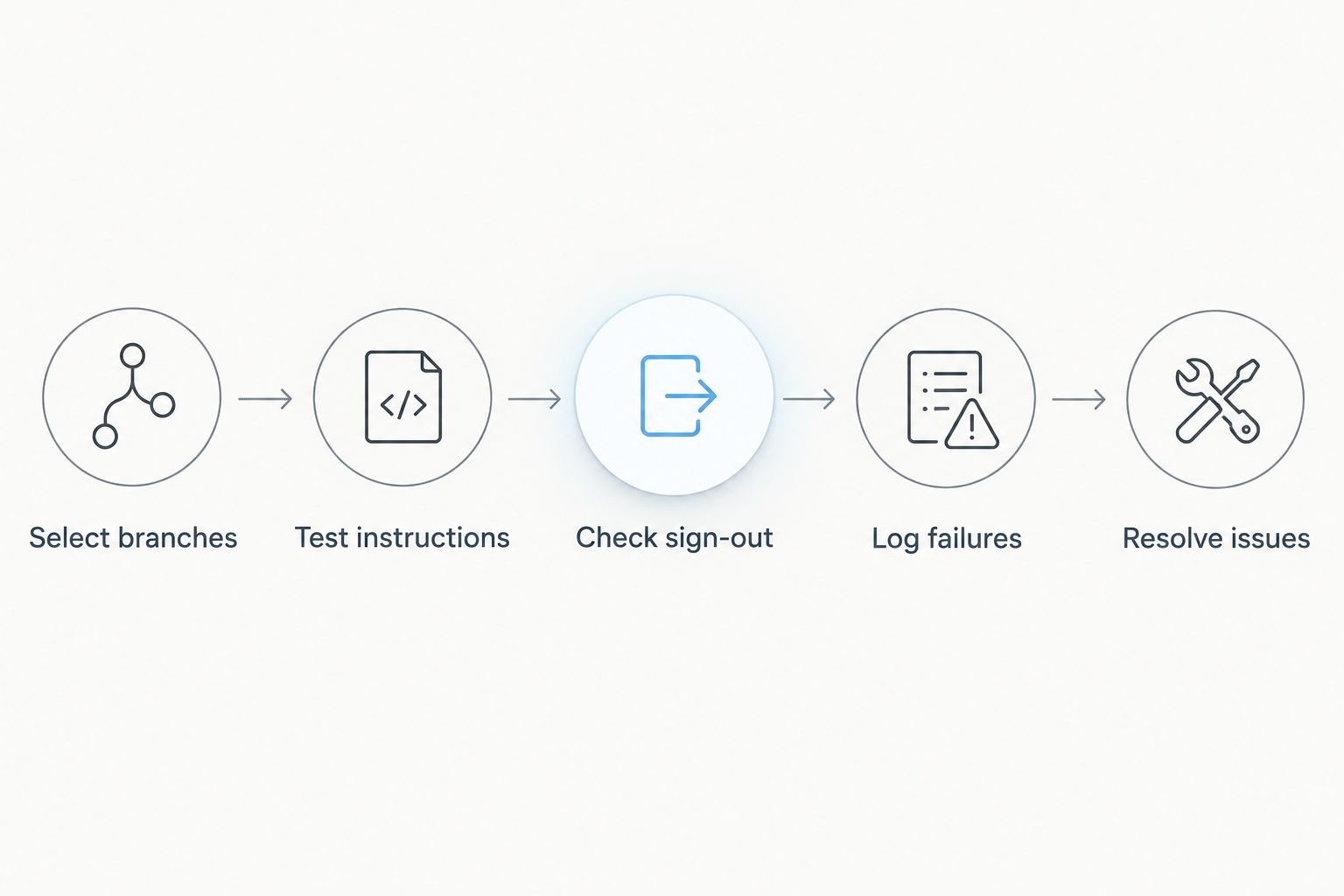
Pilot the setup in representative stores
Run a small manual pilot before deploying to every location. As a suggested starting scope, use 2 stores, test 3 workflows and observe the setup over 30 days. These are planning choices, not a promised implementation timetable or performance benchmark.
Choose branches that expose different conditions, such as a shared back-office computer and a manager who works across locations. Test reading an operational instruction, submitting a store report and completing an employee departure. These workflows reveal more than checking whether an application opens.
Record failures in a simple issue log. Distinguish account problems, missing permissions, unsuitable licensing and network interruptions so each issue reaches the right owner. Test the store's response to lost connectivity as well; Microsoft 365 access and POS continuity are different questions.
Approve the workflow, not just the installation. A successful pilot means employees can complete the defined tasks and managers know what to do when access fails.
- Select branches with different device and staffing patterns.
- Test instructions, reporting and employee departures.
- Check sign-out and access on shared computers.
- Log failures with an owner and corrective action.
- Resolve recurring issues before expanding deployment.
Measure adoption and maintain access
Begin with a manual review of your role register, issue log and document ownership. Check whether employees can find the current procedure and whether departed staff have lost access. Application activity alone does not establish that a retail workflow is working.
Assign an owner to account administration and another to each operational document area. These responsibilities can sit with different people, but they must be explicit. A technical administrator should not have to decide whether a merchandising instruction is still valid.
Build the 2026 review around observable outcomes: completed onboarding, resolved access problems, current store instructions and documented licence assignments. Record exceptions rather than allowing temporary arrangements to become permanent without review.
Remove unnecessary access before reassigning a licence. Employee departure also requires decisions about files, mailbox access and business records; follow the applicable retention and privacy requirements rather than deleting material by habit.
- Review role changes and licence assignments together.
- Check access removal for departing and seasonal staff.
- Confirm owners of shared procedures and reports.
- Track unresolved store-access issues to completion.
- Test recovery of representative business documents.
Compare deployment options for retail roles
These options describe purchasing approaches, not named Microsoft subscription tiers. Check the current Microsoft entitlements for the exact offering under consideration, including application rights, security features and Teams inclusion. Choose the approach that meets the role's requirements with the least unnecessary complexity.
| Option | Best for | Main advantage | Key limitation |
|---|---|---|---|
| Browser-first licensing | Roles that work mainly through browser-based email and documents | Fits workflows without a desktop-app requirement | Does not meet a requirement for licensed desktop applications unless those rights are included separately |
| Desktop-app licensing | Finance, buying and administration roles that require desktop applications | Supports work that depends on installed Office applications | Desktop-app rights alone do not establish the required security or device controls |
| Security-led licensing | Roles and devices that need centrally managed security controls | Makes security requirements part of the licence decision | Requires configuration, administration and a supported device setup |
| Mixed-role licensing | Chains with distinct head-office and shop-floor requirements | Matches subscriptions to different responsibilities | Requires an accurate role register and regular assignment reviews |
A supplier can help assess the purchasing scope, but your internal owners must still define access and operating rules. Voll's local support is relevant to that supplier decision; confirm the exact implementation responsibilities before treating any purchase as a completed rollout.
Common mistakes retail chains make
Buying the same setup for every employee
A uniform purchase is easy to administer but ignores differences between merchandising, finance and shop-floor work. Standardise the assessment process rather than forcing every role into the same requirement list. Review desktop applications, collaboration and security separately.
Giving everyone the store password
A shared branch identity obscures who used the account and complicates departures. Keep employee identity separate from the store's communication address, and test how named users work on shared devices. Document mailbox access instead of passing credentials between shifts.
Treating email attachments as the procedure library
An attachment stays with its recipient even after the instruction changes. Put the controlled document in the shared area, identify its owner and circulate the link. Staff need to know which version governs today's work, not merely where an old copy sits.
Assuming productivity software replaces retail management
A spreadsheet containing an exported stock report is not the same as the stock ledger. Keep transactional changes in POS or ERP and use Microsoft 365 to discuss, analyse and distribute appropriate information. Define how discrepancies are reported and corrected.
Launching without a departure process
Opening accounts is only part of administration. Store transfers, seasonal contracts and departures also change access needs. Test those events during the pilot, including shared documents and delegated mailbox access, before calling the deployment ready.
FAQ
What's the best Microsoft 365 setup for a retail chain?
The best setup matches licences and access to employee roles. Separate head-office application requirements from store workflows, and verify shared-device rights before purchasing.
Does every store employee need the same Microsoft 365 licence?
No, retail employees do not all have the same application and security requirements. Build a role inventory and check the entitlements of the subscription proposed for each role.
Can retail staff share one Microsoft 365 login?
Use identifiable employee accounts rather than sharing a branch password. Shared-device use requires a suitable configuration and confirmation of the relevant licensing rights.
Is SharePoint better than OneDrive for store procedures?
SharePoint is the better fit for shared store procedures that need organisational ownership. OneDrive is suited to an individual's working files; permissions and document ownership still need to be configured.
Can Microsoft 365 replace our retail POS or ERP?
No, Microsoft 365 does not replace a retail POS or ERP transaction system. Keep sales, inventory and invoicing records in those systems and use productivity tools for collaboration and analysis.
Does Microsoft 365 always include Teams?
Do not assume every Microsoft 365 offering includes Teams. Check the exact subscription and purchasing terms before designing your store communication around it.
Why consider Voll for a Portuguese retail chain?
Voll sells Microsoft 365 alongside POS and ERP solutions and states a focus on installation, integration and local support. Confirm the proposed scope for your chain, including which deployment tasks are included and which remain internal.
How should we test a Microsoft 365 retail rollout in 2026?
Test complete store workflows before expanding the rollout in 2026. Include shared-device sign-out, document access, reporting and employee departure, then resolve the failures found in the pilot.
One last thing
Test what happens when a store manager leaves before testing your next presentation template. That event checks identity, document ownership, delegated access and your support process at once. Ask someone outside the pilot team to follow the written departure procedure; any step that depends on an unwritten instruction needs attention before rollout.


