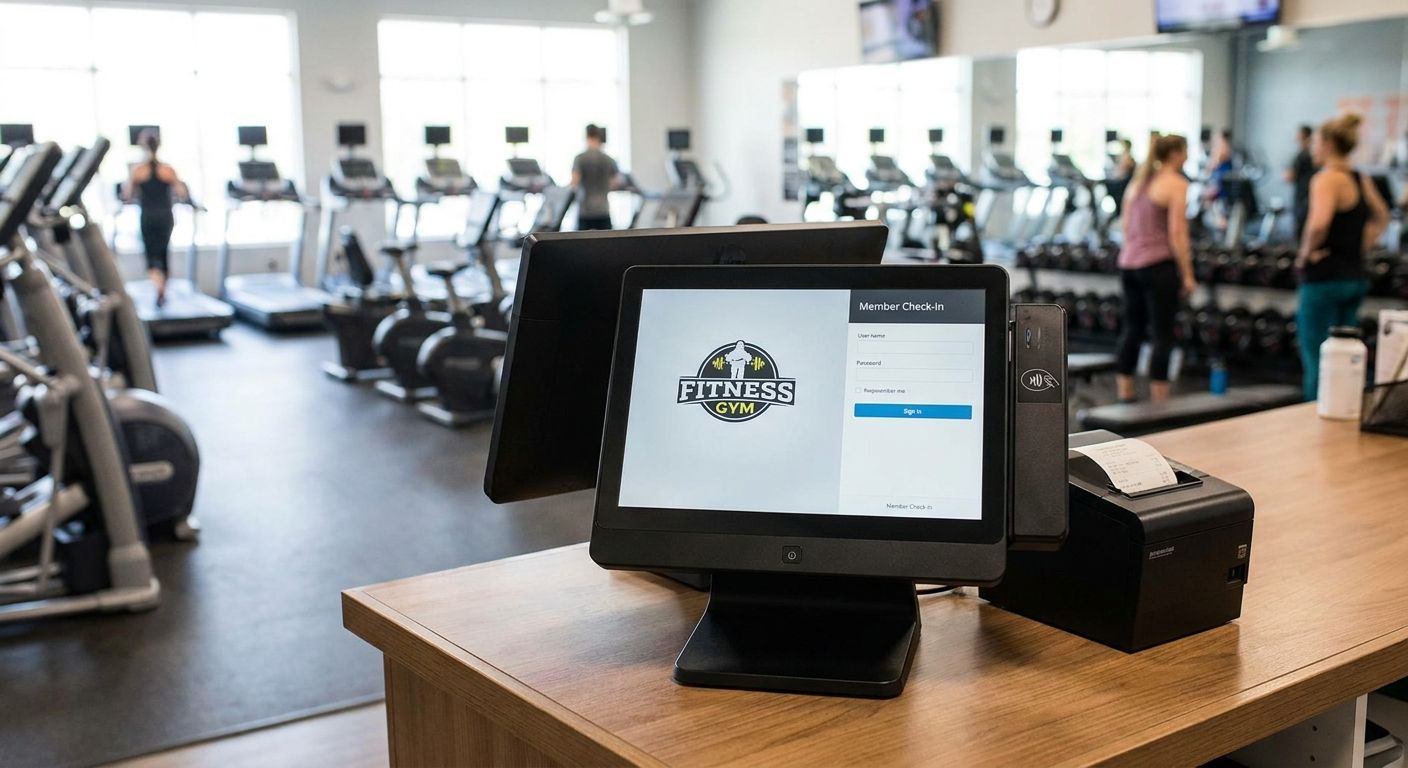
A complete POS terminal for gyms and fitness studios pairs front-desk checkout hardware with software built for recurring memberships, not a bare cash register bolted onto a card reader. What separates this segment from a typical retail shop is the mix of transaction types at one counter: membership renewals, day passes, personal training add-ons, and retail items like supplements or water, all needing to hit different accounts at month-end.
- A complete POS terminal for gyms and fitness studios needs WINTOUCH POS built for recurring billing, not a bare cash register.
- SUNMI touch terminals plus a thermal receipt printer cover front-desk checkout and retail sales in one build.
- UPS backup power protects card payments and membership scans when gym-floor equipment trips a circuit.
- Primavera/Cegid ERP integration matters once a studio runs more than one location or needs accounting sync.
- Voll quotes prices without IVA for business buyers, with delivery across Portugal in 24-48h in 2026.
Why a complete POS terminal matters for gyms
A gym front desk runs three different transaction shapes at once: a monthly membership renewal, a one-off retail sale, and a day-pass or drop-in fee. Software designed for restaurants or general retail treats all three as the same kind of sale, which means membership revenue and retail revenue end up mixed in the same report at the end of the month.
Peak load also looks different here. Class changeover creates a five-minute rush of check-ins and quick retail grabs, then goes quiet. A terminal that's slow to wake up or requires a manual price lookup for every protein bar costs real minutes during that window, and those minutes are visible to every member standing in line.
Buying the hardware and the software as one build, rather than stitching together a generic card reader with a spreadsheet for memberships, is the difference between a front desk that keeps up with class changeover in voll.pt's network of business customers and one that falls behind by month three.
Set up your transaction map first
Before picking hardware, list what actually crosses the counter:
- Membership sign-ups and monthly renewals
- Day passes and drop-in guest visits
- Retail sales: supplements, apparel, water, gear
- Personal training or class-pack add-ons
- Locker or towel rental fees
This list decides whether you need a simple card terminal or a full POS with inventory tracking.
Choose POS software built for recurring billing
A generic checkout app can ring up a bottle of water. It usually cannot handle a membership that renews automatically every 30 days, pauses for a member on holiday, or upgrades mid-cycle. WINTOUCH POS is built to separate recurring membership billing from one-off retail sales inside the same system, which is the core requirement for this segment.
- Confirm the software supports automatic renewal and installment billing, not just single charges
- Check that it splits membership revenue from retail revenue in reporting, without manual reclassification
- Ask whether it handles day-pass and guest-visit pricing separately from monthly plans
- Verify it tracks retail inventory (supplements, apparel) alongside membership data
- Confirm multi-user login so shift handoffs don't require logging out and back in
The full setup lives on voll.byryze.com/wintouch-pos-software-for-restaurants-and-retail, which covers how WINTOUCH handles mixed transaction types beyond just gyms.
Pick a terminal built for gym-floor conditions
A touchscreen terminal at a gym front desk takes more abuse than one behind a boutique counter: sweaty hands, spilled water bottles, and constant tapping between check-ins.
- Choose a sealed touchscreen terminal (SUNMI-class hardware) over a bare tablet in a case
- Add a barcode scanner for retail items so staff aren't typing prices manually during rush
- Keep a cash drawer on hand even in a mostly-card business — day passes and small retail sales still bring cash
- Pair with a thermal receipt printer for retail receipts and membership confirmations
- Confirm the terminal mounts securely at counter height, not propped on a stand that shifts
Add a payment terminal built for fast checkout
Checkout speed at a gym front desk is measured in seconds, not minutes, because the next member in line is already tapping their foot.
- Pick a payment terminal that supports Multibanco and contactless cards without a manual entry fallback
- Confirm it pairs directly with the POS software so payments post automatically to the right account
- Check battery life if the terminal needs to move between the front desk and a pop-up retail table
Compare terminal options built for this kind of speed at voll.byryze.com/payment-terminals-for-fast-retail-checkout.
Protect the front desk against power drops
Gyms share electrical circuits between front-desk equipment and cardio machines. A treadmill bank kicking on can dip the circuit enough to reboot a POS terminal mid-transaction, which means a lost sale and an annoyed member holding a card at the counter.
- Add battery backup power to the terminal and card reader, not just the router
- Test the backup under load before opening day, not after the first outage
- Keep a manual card-imprint or offline sale process as a fallback for the rare total outage
Plan for ERP integration before you need it
A single-location studio can run on POS reporting alone through most of 2026. A gym chain with two or more locations, or one that needs accounting sync with Primavera or Cegid, needs the ERP link built in from day one rather than migrated under pressure later.
- Confirm the POS can push sales data to Primavera or Cegid without manual export
- Check whether membership revenue recognition (monthly vs. annual plans) maps correctly to your chart of accounts
- Ask if multi-location reporting rolls up automatically or needs per-site reconciliation
Comparing POS options for gyms and fitness studios
| Option | Best for | Notable feature | Verdict |
|---|---|---|---|
| WINTOUCH POS + terminal bundle | Multi-service gyms running memberships and retail together | Recurring billing split from retail revenue, ERP-ready | Buy for full-service studios |
| Standalone payment terminal only | Small studios already running a separate membership app | Fast contactless checkout, no inventory tracking | Hold — fine short-term, outgrows fast |
| Legacy cash register | Very small, single-location, cash-heavy studios | No card processing, no reporting | Skip once you take cards regularly |
The standalone terminal works for a solo studio that already has a membership app handling billing. Once retail sales or a second location enter the picture, that setup starts producing two sets of numbers that don't reconcile.
Common mistakes gyms make with POS setup
- Running membership billing on a spreadsheet while retail runs through POS. The two never reconcile cleanly at month-end, and someone spends hours matching totals by hand.
- Skipping the barcode scanner. Staff typing in prices for protein bars and drinks during class changeover is the single biggest speed killer at a gym counter.
- No backup power on the terminal. A tripped circuit from cardio equipment mid-transaction means a frozen screen and a member standing at the counter.
- Waiting until a second location opens to plan ERP integration. Retrofitting Primavera or Cegid sync onto live sales data is far messier than building it in from the start.
- Leaving the cash drawer unreconciled between shifts. Day-pass cash sales go unaccounted for when shift handoffs skip a count.
FAQ
What is a complete POS terminal for gyms?
It's a checkout setup that combines hardware — touchscreen terminal, card reader, cash drawer, receipt printer — with software built to handle recurring membership billing alongside retail sales in one system. A generic card reader alone can't split membership revenue from retail revenue.
Does a gym POS need to integrate with an ERP?
Single-location studios can run on POS reporting alone for a while, but any gym running two or more locations, or needing accounting sync, benefits from Primavera or Cegid ERP integration built in from the start rather than added later.
Can a gym POS handle both memberships and retail sales?
Yes, but only if the software is built for it. WINTOUCH POS separates recurring membership billing from one-off retail transactions in reporting, which generic checkout apps typically don't do.
Why does a gym POS terminal need backup power?
Gym front desks often share electrical circuits with cardio equipment, and a load spike from a treadmill bank can dip the circuit enough to reboot a POS terminal mid-sale. Backup power on the terminal and card reader prevents lost transactions during those dips.
Is a barcode scanner necessary for a gym retail counter?
For any gym selling supplements, drinks, or apparel, yes. Manually typing prices during class changeover slows down the exact moment when checkout speed matters most.
How fast can a gym get a POS terminal delivered in Portugal?
Delivery runs 24-48h across Portugal in 2026 for business orders, with pricing quoted without IVA for business buyers.
Should a small studio still keep a cash drawer?
Yes, even mostly-card businesses see cash for day passes and small retail sales, so a cash drawer with reconciliation built into the POS avoids unaccounted cash between shifts.
One last thing
The part gym owners underestimate in 2026 isn't the terminal itself — it's the electrical environment it sits in. A front desk wired on the same circuit as a bank of treadmills is a POS reliability problem long before it's a software problem, and no amount of checkout speed fixes a terminal that reboots every time class starts.


