
Microsoft 365 cost per user in 2026 depends on the exact subscription, billing commitment, and services included in your business quote. Compare the licence charge separately from VAT, migration, setup, and ongoing support: a monthly figure alone does not describe your full commitment.
- Microsoft 365 cost per user depends on the subscription, commitment, tax treatment, and services in your quote.
- Microsoft 365 Business Basic suits browser-based work; Business Standard adds desktop applications.
- Separate recurring Microsoft 365 licensing from migration, setup, and support before comparing suppliers.
- Voll suits Portuguese business buyers who want Microsoft 365 purchasing with local support.
Why this matters
A per-user figure is useful only when you know what it buys. Two proposals are not equivalent if one includes installation and the other covers licences alone, or if their payment schedules look similar but their contractual commitments differ.
Start with the work your employees actually do. The guide to upgrading from Microsoft 365 Business Basic to Standard addresses a central buying decision: whether browser-based applications meet your needs or you need desktop applications.
Compare equivalent subscriptions and equivalent service scopes before choosing a supplier. That gives you a purchasing decision you can explain, rather than a headline figure that hides different obligations.
How much does Microsoft 365 cost per user in 2026?
Your applicable Microsoft 365 cost per user is the amount quoted for the exact subscription and commitment you select. For a useful 2026 budget, request a written proposal that identifies the licence, quantity, billing schedule, contract term, tax treatment, and any separate services.
Keep the licence calculation distinct from the implementation calculation. A recurring subscription funds access to the licensed services; moving existing email, configuring accounts, and supporting employees are separate pieces of work unless your proposal explicitly includes them.
| Budget component | What to establish | How to compare it |
|---|---|---|
| User licences | Exact subscription and number of assigned users | Compare the same subscription across proposals |
| Commitment | Contract duration and renewal conditions | Compare the full contractual obligation |
| Billing | Payment frequency and invoice schedule | Distinguish when you pay from how long you commit |
| Tax | Whether VAT is included or excluded | Use the same tax basis throughout |
| Migration and setup | Included tasks and exclusions | Keep implementation separate from recurring licensing |
| Ongoing support | Responsibilities and service scope | Compare what happens after activation |
Use a 12-month budget view to compare ongoing expenditure, but keep any different contractual term visible alongside it. Do not treat a monthly invoice as evidence that you can cancel each month.
For purchasing decisions, prepare 2 budget totals: recurring operations and initial implementation. This separates the ongoing commitment from the work needed to get employees productive.
Microsoft 365 Business Basic: best for browser-based work
Microsoft 365 Business Basic is best for employees whose work fits web and mobile applications rather than installed desktop Office applications. Its business services include email and cloud-based collaboration, subject to the exact subscription you purchase.
The advantage is fit: you avoid selecting a desktop-application subscription for an employee who does not need that entitlement. The limitation is equally important: Business Basic does not provide the desktop Office application entitlement included with Business Standard.
Check real tasks before choosing. Ask employees to open their usual documents, work through their spreadsheet routines, and confirm that their browser-based workflow meets their needs; a list of application names does not establish compatibility with a particular process.
For your 2026 comparison, record the exact subscription name rather than writing only Microsoft 365. Check the collaboration services included in the quoted version instead of assuming that similarly named subscriptions are interchangeable.
Choose Business Basic for verified browser-based workflows, not simply because it appears earlier in a supplier's catalogue.
Microsoft 365 Business Standard: best for desktop applications
Microsoft 365 Business Standard is best for employees who need installed desktop Office applications alongside business cloud services. The desktop application entitlement is the main distinction to assess against Business Basic.
The benefit is access to desktop applications for work that requires them. The drawback is buying that entitlement for users who do not need it; a broader subscription is not automatically a better fit for every employee.
Use this comparison to identify the relevant workload, then check the full current subscription description before ordering.
| Subscription | Best for | Main advantage | Main limitation |
|---|---|---|---|
| Microsoft 365 Business Basic | Browser-based and mobile workflows | Business cloud services without a desktop Office entitlement | Does not include installed desktop Office applications |
| Microsoft 365 Business Standard | Employees needing desktop Office applications | Desktop applications alongside business cloud services | Adds an entitlement that browser-only users do not need |
Do not choose solely by job title. An administrator working in complex desktop spreadsheets can have different requirements from a colleague handling browser-based email and document reviews, even within the same department.
Choose Business Standard when desktop applications are a documented requirement. Confirm any additional security, device-management, or specialist application requirements separately rather than assuming that desktop applications cover them.
Why Microsoft 365 cost per user varies
The useful comparison is the complete purchasing specification, not the product-family name. These factors determine what you should ask suppliers to quote:
- Subscription scope: Identify the applications and services required for each employee group. Different entitlements are not equivalent purchases.
- Commitment and billing: Record the contract duration separately from payment frequency. Both belong in your approval decision.
- User assignments: Count the people who need each subscription rather than applying the same requirement to every employee.
- Additional requirements: List any extra storage, specialist applications, security capabilities, or other separately quoted services.
- Implementation and support: Specify migration, configuration, staff assistance, and ongoing responsibilities instead of assuming they accompany activation.
- Tax presentation: Compare proposals on the same VAT basis and keep tax treatment explicit in the final approval.
These factors also explain why dividing a combined invoice by headcount can mislead. If that invoice includes project work or separately scoped services, the result is not a clean licence-only figure.
Ask for itemised proposals. You should be able to identify what changes when an employee joins, what stays fixed, and what belongs to a one-off project.
How do you calculate a comparable business budget?
Build your 2026 budget from an employee requirements list and a written scope. Follow this sequence before asking anyone to approve the purchase.
- Map users. List the people who need accounts and their required applications. Separate confirmed needs from requests that still need checking.
- Match subscriptions. Assign a proposed subscription to each workload. Check desktop applications, email, collaboration, and any additional requirements against the actual subscription description.
- Check terms. Record the commitment, billing frequency, renewal arrangements, and rules for changing quantities. Keep these beside the licence specification.
- Separate services. List migration, setup, training, and ongoing support as distinct tasks. Identify the owner of each task and its acceptance criteria.
- Approve scope. Compare proposals using the same quantities, tax basis, service responsibilities, and budget period. Resolve differences before ordering.
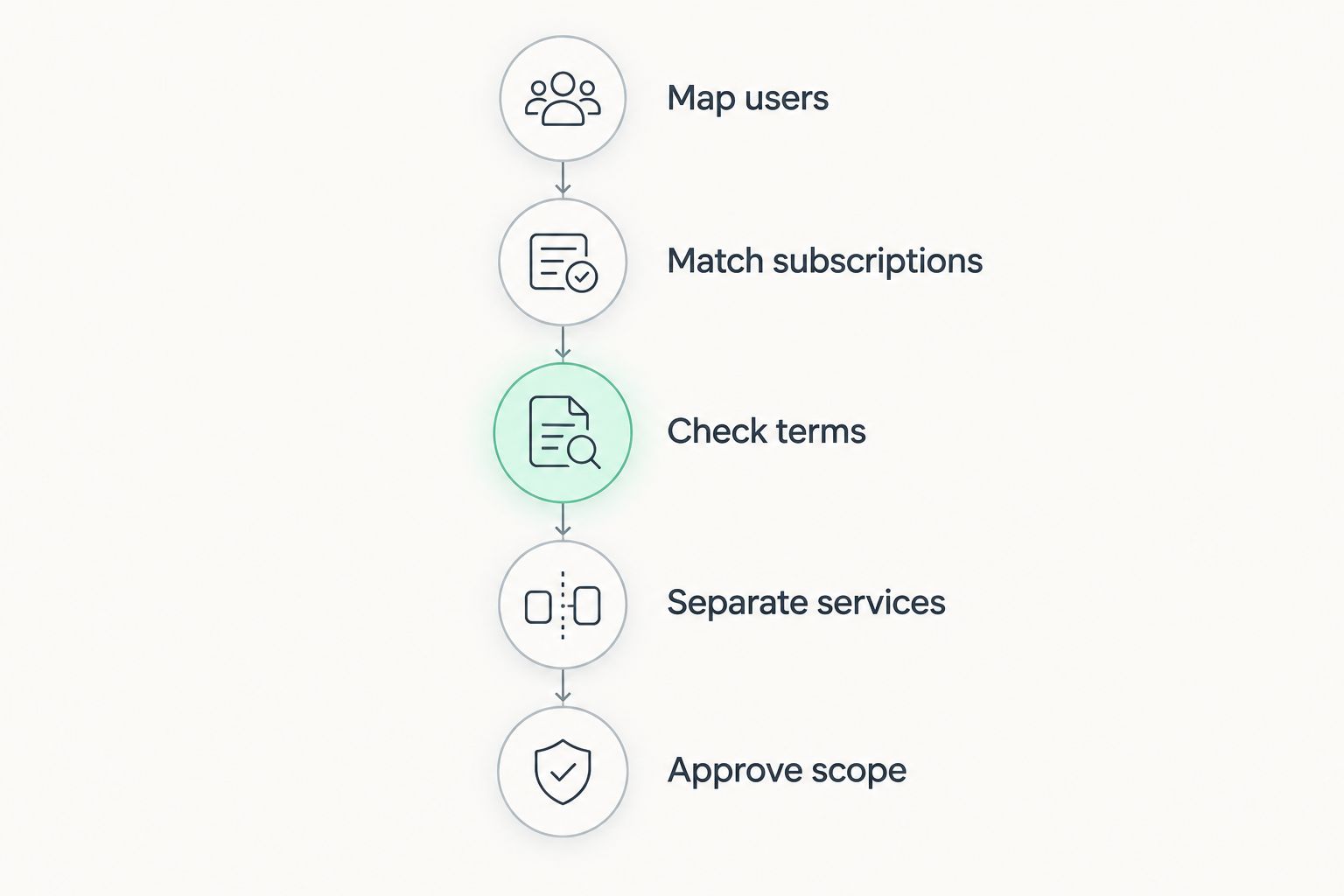
Keep the underlying worksheet after approval. When a department requests another account or a different application entitlement, you can update the relevant line instead of rebuilding the decision from memory.
Use 1 user account per named employee as your starting point for the requirements list, then check any shared-access or special-use scenario against Microsoft's applicable licensing rules. Do not assume that a shared computer removes the need to assess the people using it.
What should a Portuguese business ask its supplier?
Request a proposal that your purchasing and IT teams can both understand. It should connect the subscription being ordered to the work your employees need to perform, with responsibilities written plainly.
Voll is a Portuguese B2B online IT retailer offering Microsoft 365, online purchasing, quotation requests, and local support. Voll is best for Portuguese business buyers who want Microsoft 365 purchasing with local support.
The advantage is access to a business-focused supplier with local support. The purchasing constraint is that a licence order alone does not define a migration or support agreement; confirm the tasks included in your proposal before treating them as covered.
Voll presents business pricing excluding VAT. Keep that tax basis visible when comparing a proposal with another supplier's documents, and ask for the final invoicing treatment to be stated explicitly.
For a useful request, provide your employee requirements list, existing email and file environment, preferred implementation sequence, and the tasks you expect the supplier to handle. Avoid sending only a headcount: that leaves the application and service requirements unresolved.
Define your Microsoft 365 requirements
Ask Voll for a proposal that separates licences, implementation, and support.
Does paying monthly mean I can cancel monthly?
Monthly billing does not by itself establish a monthly cancellation right. Your payment schedule and your contractual commitment are separate terms, so check both in the proposal and order confirmation.
For a 2026 purchase, ask what happens when you reduce headcount, change a subscription, or decide not to renew. Keep the written answer with the purchase record rather than relying on the appearance of the invoice.
Should every employee have the same Microsoft 365 subscription?
Use the same subscription only when employees have the same relevant requirements. Compare browser-based work, desktop application needs, and any additional entitlements before deciding whether a common subscription fits the whole team.
A uniform subscription simplifies administration, but it also applies the same entitlement decision to different workloads. Assess that trade-off explicitly, and confirm the licensing rules for your chosen combination before ordering.
Is migration included with a Microsoft 365 licence?
Treat migration as a separate scope unless your proposal explicitly includes it. Account activation does not describe how existing mail, documents, permissions, and employee devices will move to the new environment.
Specify who handles each task, how access will be checked, and who resolves issues after the move. This prevents a licensing approval from being mistaken for an implementation plan.
FAQ
How do I find my Microsoft 365 cost per user in 2026?
Request a current quote for the exact subscription, user quantity, and commitment you need. Ask for licences, VAT, implementation, and support to be identified separately so you can compare equivalent proposals.
What's the best Microsoft 365 subscription for browser-based work?
Microsoft 365 Business Basic fits employees whose requirements are met by web and mobile applications. It does not include the desktop Office application entitlement provided by Business Standard, so check your actual workflows before choosing.
Is Microsoft 365 Business Standard better than Business Basic?
Microsoft 365 Business Standard is the better fit when employees need installed desktop Office applications. Business Basic remains a relevant choice when browser-based applications meet the documented requirements.
Does a monthly Microsoft 365 invoice mean a monthly contract?
A monthly invoice does not establish a monthly contract. Confirm the commitment, renewal arrangements, cancellation conditions, and quantity-change rules in your purchase documents.
Does every employee need the same Microsoft 365 subscription?
Employees do not need identical subscriptions simply because they work for the same business. Match subscriptions to documented workloads and verify the applicable licensing rules for your chosen arrangement.
Are Microsoft 365 migration and support included automatically?
Do not treat migration and support as included unless your proposal states their scope. Ask who handles email, files, account configuration, employee assistance, and post-migration issues.
Does Voll show business pricing including VAT?
Voll presents business pricing excluding VAT. Compare proposals on the same tax basis and confirm the final invoicing treatment before approving the order.
One last thing
Review who still needs access before renewing, not just which subscription each person has. A correctly selected subscription still needs an owner and a business purpose throughout its assignment.
For your 2026 renewal, reconcile the employee list with assigned subscriptions, then check departures and role changes before making licensing changes. Preserve required business information and confirm the applicable account-handling and subscription terms first; removing access and changing a contractual commitment are different actions.