
Yes, you can use your own domain for email with Microsoft 365 when your subscription includes Exchange Online business email. You must verify domain ownership, create the required mailboxes and configure your domain’s DNS records. Connecting the domain does not automatically transfer existing messages, and you can keep your website and domain registration with their current providers.
- Microsoft 365 custom domain email requires domain verification, Exchange Online mailboxes and correctly configured DNS records.
- Create mailboxes before changing the MX record; domain verification alone does not redirect incoming email.
- Keep your existing website and domain registrar; move email separately.
- VOLL suits Portuguese businesses seeking Microsoft 365 licensing and local support.
Can I use my own domain email with Microsoft 365?
Yes. You need control of the domain’s DNS settings and a subscription that includes Exchange Online email. An Outlook application licence alone does not establish that you have a hosted business mailbox.
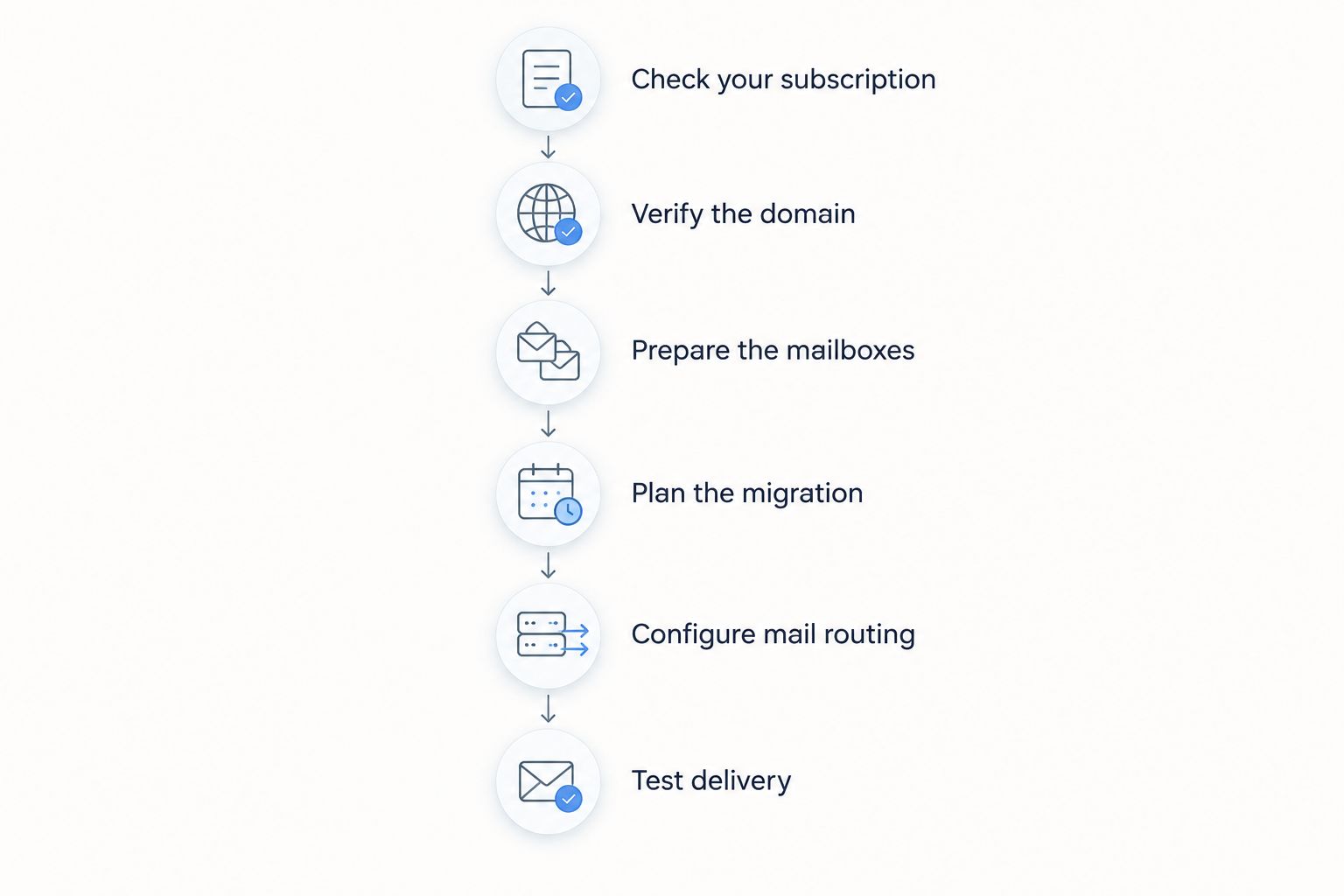
For an existing business address, separate domain setup from mailbox migration. The guide to migrating business email and files to Microsoft 365 covers the wider move; the sequence below focuses on connecting your domain without overlooking mail delivery.
Check your subscription
Confirm that your subscription includes Exchange Online, rather than assuming that access to Microsoft applications includes email hosting. Check the services assigned to each user in the Microsoft 365 admin centre.
You also need administrator access to Microsoft 365 and access to the service hosting your authoritative DNS records. Your domain registrar and DNS host are not necessarily the same company, so identify the actual DNS host before making changes.
Verify the domain
Add your domain through the domain setup area in the Microsoft 365 admin centre. Microsoft provides a verification record, commonly a TXT record, which you publish at your DNS host.
Use the exact record supplied for your organisation. Verification proves ownership; it does not move existing messages or make Microsoft 365 the destination for incoming mail.
Prepare the mailboxes
Create the user accounts and mailboxes that need to receive email, then assign the appropriate licences. Reproduce existing addresses, aliases and shared addresses deliberately rather than assuming that domain setup discovers them.
Record who owns each address and who needs access. An address used by your accounts team needs a different access arrangement from an employee’s personal mailbox, even when both use the same domain.
Plan the migration
Decide how existing messages, calendars and contacts will reach the new environment. The method depends on the current mail system; an IMAP migration, for example, transfers email rather than calendar and contact data.
Keep access to the old service while you check the transfer. Establish who will confirm that important folders, recent correspondence and shared resources are present before you retire the previous environment.
Configure mail routing
Follow the domain setup instructions to publish the required DNS records. The MX record determines where external senders deliver incoming email, while other records support client configuration and sender authentication.
Change mail routing only after the receiving mailboxes are ready. Do not replace website records simply because you are moving email; website hosting and email hosting are separate services.
Test delivery
Send messages to and from an external email account, then test replies, aliases and shared mailboxes. Check that the recipient sees the intended business address and that messages reach the correct mailbox.
Also test applications that send email for your business. Website forms, invoicing software and multifunction printers need their own checks; a successful Outlook test does not prove those senders still work.
Why this matters
Your business email address can remain unchanged while the service behind it changes. That preserves the address customers know, but it also makes preparation important: a familiar address does not reveal whether its mailbox, permissions or historical messages have moved correctly.
For a Microsoft 365 deployment in 2026, treat the project as a mail-service change, not just a DNS edit. Domain verification, message migration and delivery testing solve different problems, and completing one does not complete the others.
Which custom-domain setup fits your business?
The right approach depends on whether you are creating new addresses, moving existing mailboxes or adding addresses to an established mailbox. These are different tasks, despite using the same domain.
| Setup | Best for | Main benefit | Main limitation |
|---|---|---|---|
| New business mailboxes | A business starting email on its domain | No historical mailbox data to transfer | Users and DNS still need configuration |
| Migration of existing mailboxes | A business keeping its established addresses | Preserves customer-facing addresses | Historical data and access need separate migration checks |
| Additional email aliases | A person receiving several addresses in the same mailbox | Consolidates incoming correspondence | An alias is not an independent mailbox |
| Shared mailbox | A team handling a common business address | Supports delegated access for team members | Permissions and sending behaviour need configuration |
Choose the mailbox structure before you redirect incoming email. Adding addresses first and sorting out ownership later creates avoidable confusion over who receives messages and who can reply.
New business mailboxes: best for a fresh start
A new domain has no old mailbox history to move, so the work centres on ownership verification, account creation and DNS configuration. You still need to establish recovery access, administrator responsibilities and appropriate authentication.
The advantage is a simpler starting point. The limitation is that a new domain does not remove the need to configure sending applications or protect administrator accounts.
Existing mailbox migration: best for keeping established addresses
You can retain your existing addresses while moving their mailboxes to Microsoft 365. The domain remains yours; the incoming mail destination changes.
The benefit is continuity for customers and suppliers. The limitation is that older messages, calendars, contacts and permissions require attention beyond the MX record change, so define what must transfer before you begin.
Aliases and shared mailboxes: best for different access needs
Use an alias when another address should deliver to an existing mailbox. Use a shared mailbox when a business function needs its own mailbox with delegated access for team members.
An alias is convenient, but it does not provide independent storage or a separate sign-in. A shared mailbox separates team correspondence, but you must configure access and sending permissions rather than sharing an employee’s password.
Which DNS records does Microsoft 365 email need?
Use the records displayed in your organisation’s Microsoft 365 setup process. Do not copy another company’s MX destination, verification value or DKIM targets: those values are specific to the relevant configuration.
| Record or setting | What it does | What it does not do |
|---|---|---|
| Verification TXT record | Demonstrates control of the domain | Transfer messages or redirect incoming email |
| MX record | Directs incoming email to the receiving service | Authenticate every outgoing message |
| SPF TXT record | Identifies authorised sending infrastructure | Encrypt email or replace DKIM |
| DKIM configuration | Enables cryptographic signing of outgoing messages | Set the domain’s policy for failed authentication |
| DMARC TXT record | Defines handling and reporting policy for authentication alignment | Repair an incorrectly configured sender |
| Autodiscover record | Helps compatible clients locate mailbox settings | Migrate historical mailbox contents |
Microsoft’s custom-domain DKIM configuration uses 2 CNAME records, supporting its signing selectors. Publish the exact targets supplied for your domain, then enable DKIM signing through the relevant administration settings.
SPF permits 1 SPF record per domain, not separate SPF records for every sending service. Its evaluation also has a limit of 10 DNS-querying terms, as defined in the SPF standard, RFC 7208; review the full record when adding Microsoft alongside other senders.
For your 2026 configuration, include every legitimate sending service in the authentication review. An ERP-generated invoice and a marketing message can use different infrastructure from a staff mailbox, even when their visible sender addresses share the same domain.
Why Microsoft 365 custom domain email setup varies
The domain connection follows the same underlying principles, but the surrounding work depends on your existing environment:
- DNS access: You need permission to edit the authoritative DNS zone, not merely access to the domain renewal account.
- Current mail platform: The source system determines the available migration methods and which data needs separate handling.
- Address structure: User mailboxes, aliases, groups and shared mailboxes have different purposes and access requirements.
- Other sending systems: Website forms, business software and devices must remain authorised and correctly configured.
- Existing Microsoft tenancy: A domain already associated with another Microsoft 365 organisation requires that association to be resolved before reuse.
Resolve access and ownership before scheduling the switch. Waiting until the routing change to discover that another supplier controls DNS or the existing tenant puts the migration sequence in the wrong order.
Can I keep my website and domain registrar?
Yes, you can keep your website and domain registrar while Microsoft 365 hosts your email. Update the necessary email records at your DNS host without changing the website’s records.
Avoid changing nameservers unless your project specifically requires a DNS-hosting move. A nameserver change affects the whole DNS zone, so every existing service needs to be accounted for.
Will adding my domain move my old emails?
No, adding your domain does not move your old emails. Domain verification establishes ownership, and the MX record controls incoming delivery; neither action transfers mailbox history.
For a 2026 migration, document email, calendar, contact and shared-mailbox requirements separately. Confirm the chosen migration method covers each requirement rather than assuming everything visible in the old email application will transfer together.
Can I use the same domain with two email providers?
Yes, a domain can participate in a deliberately configured split-delivery arrangement, but publishing competing MX records is not a mailbox migration plan. MX preferences do not decide which provider should receive mail for each employee.
If some users must remain on the old service, configure supported routing and connectors for that design. For a straightforward business move, preparing the destination and carrying out a controlled routing change is easier to administer than an improvised split.
When should you ask for local support?
VOLL is best for Portuguese businesses seeking Microsoft 365 licensing and local support. The relevant decision is whether your team can handle DNS ownership, mailbox preparation, migration and application testing—not simply whether someone can install Outlook.
VOLL supplies Microsoft 365 within its business IT offering, with installation and local support described in its services. Confirm the scope of any proposed work, including historical data, shared addresses and business-software senders, before approving the change.
External assistance does not remove your responsibility to retain control of the domain and administrator access. Record who owns those accounts and how your business can recover them.
FAQ
Can I use a domain I already own with Microsoft 365?
Yes, Microsoft 365 supports an existing domain for business email when your subscription includes Exchange Online. Verify ownership, create the mailboxes and configure the required DNS records.
Do I have to transfer my domain to Microsoft?
No, you can keep your domain with its existing registrar. You need access to the authoritative DNS settings to publish Microsoft’s required email records.
Does an Outlook app licence include custom-domain email hosting?
An Outlook app licence alone does not establish that you have hosted business email. Check that your subscription includes Exchange Online and that the service is assigned to the user.
Can I keep my current business email address?
Yes, you can retain your current address if you control its domain. Create the matching destination address and plan any historical mailbox migration separately.
Will changing the MX record delete my old emails?
Changing the MX record does not itself delete messages stored with your previous provider. Keep the previous service accessible until migration and verification are complete.
Can several business addresses deliver to one mailbox?
Yes, aliases can deliver several addresses to the same mailbox. Use a shared mailbox instead when a team needs delegated access to a separate business mailbox.
Can VOLL help with Microsoft 365 for a Portuguese business?
VOLL offers Microsoft 365 licensing within its Portuguese B2B IT business, alongside installation and local support. Confirm the required migration and configuration work when discussing the service scope.
One last thing
An invoice sender deserves the same cutover test as an employee mailbox. Your staff can receive email successfully while business software still sends through an old provider or fails authentication.
Before closing your 2026 migration, send a real test through each approved business workflow and check receipt externally. Keep the old service until the required data, addresses and sending workflows have passed their checks.