A Microsoft 365 email migration has no fixed completion time: the schedule depends on your source system, mailbox contents, migration method and measured transfer performance. For a 2026 migration, separate the background data transfer from the user switchover; copying messages is not the same as having everyone working successfully in Outlook.
- Microsoft 365 email migration time needs a pilot-based estimate, not a universal deadline.
- Exchange Online data transfer and email cutover are separate milestones; plan and validate both.
- IMAP moves email, not calendars or contacts; include those separately in your migration scope.
- Voll supplies Microsoft 365 to Portuguese businesses; confirm migration responsibilities separately from licensing.
How long does a Microsoft 365 email migration take?
Your migration estimate should come from a representative pilot, not mailbox count alone. A mailbox with many small messages presents a different transfer workload from a mailbox containing fewer large attachments. Authentication failures, source-server restrictions and unsupported items also affect completion.
Start by defining what finished means. If you are also moving documents, use the broader guide to migrating business email and files to Microsoft 365 to keep those workstreams separate.
Build your schedule around these 3 milestones:
- Initial transfer: Historical messages copy into destination mailboxes using the selected migration method.
- Email cutover: Mail routing and user access switch to the destination according to the approved plan.
- Final validation: Administrators resolve outstanding synchronisation issues and users confirm that essential workflows work.
These milestones are not necessarily consecutive blocks of downtime. Supported migration methods can copy historical mail while users continue working in the source environment. The cutover still needs its own readiness checks and communication plan.
Why this matters
For a 2026 project, ask for separate dates for data readiness, user switchover and acceptance. A single completion date hides whether the estimate includes Outlook configuration, mobile devices, shared mailboxes and business applications that send email.
A mailbox is not ready just because its migration batch says complete. Your team also needs to sign in, send messages, receive replies and access the resources required for daily work.
Which migration approach fits your source system?
The source environment determines which methods are applicable. Choose the method before estimating duration, because transfer scope and cutover behaviour differ.
| Approach | Best for | Main advantage | Main limitation | Scheduling implication |
|---|---|---|---|---|
| IMAP migration | Email-only moves from supported IMAP services | Copies email without requiring an Exchange source | Does not migrate calendars, contacts or tasks | Schedule non-email data separately |
| Exchange cutover migration | Eligible Exchange environments moving together | Provides a coordinated organisation-wide move | Requires readiness across the population being switched | Validate the whole cutover group before switching |
| Exchange hybrid migration | Eligible Exchange environments needing coexistence | Supports mailbox moves while maintaining a connected environment | Requires hybrid configuration and administration | Include environment preparation and batch validation |
| Google Workspace migration | Organisations moving from Google Workspace | Supported tooling can address more than email, depending on configuration | Permissions, prerequisites and supported data require checking | Pilot each required data type before approving the schedule |
No approach wins for every organisation. Choose the method that supports your required data and operating model, then measure its performance in your environment.
Do not choose IMAP simply because the account credentials are available. If users depend on calendars and contacts, an email-only transfer leaves part of the project unfinished. Likewise, hybrid configuration is not justified solely by a desire to move a straightforward email-only workload.
IMAP migration: allow for non-email work
IMAP migration transfers email rather than the complete collaboration experience. Calendars, contacts and tasks need a separate supported method if they are in scope.
Check the source folder structure and destination results during the pilot. A successful message transfer does not prove that users have all the information they need to resume work.
Exchange migration: include dependencies beyond messages
Exchange migrations require attention to identities, permissions and the chosen deployment model. Shared mailbox access, delegation and application connections belong in the acceptance checks, not in an informal list of jobs to finish afterwards.
For your 2026 schedule, establish which configuration tasks are handled by the migration method and which require administrator action. That distinction prevents a data-copy estimate from becoming an unsupported promise about user readiness.
Why Microsoft 365 email migration time varies
The main scheduling factors are technical dependencies you can inspect and test. Record them before committing to a cutover window.
- Data volume and item count: Both affect the workload. Total storage alone does not describe the number of objects the migration must process.
- Source service restrictions: Connection limits, throttling and account access rules affect how migration tooling reads data.
- Migration scope: Email-only transfer differs from a project that includes calendars, contacts, archives and shared resources.
- Identity and permissions: Incorrect credentials, missing privileges or incomplete destination accounts stop progress regardless of connection speed.
- Mail routing and DNS: Record changes and cached DNS responses affect the transition of incoming mail.
- Endpoint and application readiness: Outlook profiles, mobile access and applications that send email need their own checks.
Buying a faster office connection does not remove source-service restrictions. Nor does assigning a licence prove that a destination mailbox is configured correctly for the migration.
Investigate the actual bottleneck before changing the schedule. A stalled batch needs an error review; adding time without correcting its cause does not make the estimate more reliable.
How do you build a usable migration estimate?
Use a pilot to turn assumptions into a schedule. The purpose is to identify both transfer performance and the work that happens around it.
Define scope
Create an inventory of user mailboxes, shared resources, aliases and application senders. Record mailbox storage and item counts where available, along with the source platform and required data types.
Separate essential requirements from optional cleanup. Decide whether local archives, historical exports and disconnected accounts belong in the same project before measuring anything.
Run a pilot
Select mailboxes that represent the actual workload, including a large mailbox and a user with shared-resource access where those exist. A convenient test account with little data is not a useful proxy for the organisation.
Record elapsed transfer time, successful items, failures and administrator intervention. Check the destination contents rather than relying only on the progress indicator.
Plan cutover
Use the pilot results to plan batches and identify unresolved dependencies. Do not assume every mailbox will complete at the same rate, or that increasing concurrency will produce a proportional improvement.
Assign responsibility for routing changes, user communication and support. Define the conditions that must be met before approving the switch.
Validate completion
Test user access and business workflows after the switch. Review migration reports, investigate skipped items and document any exceptions that remain open.
Keep source access available according to an approved retention and recovery plan. Do not cancel the old service merely because incoming mail has started arriving at the destination.
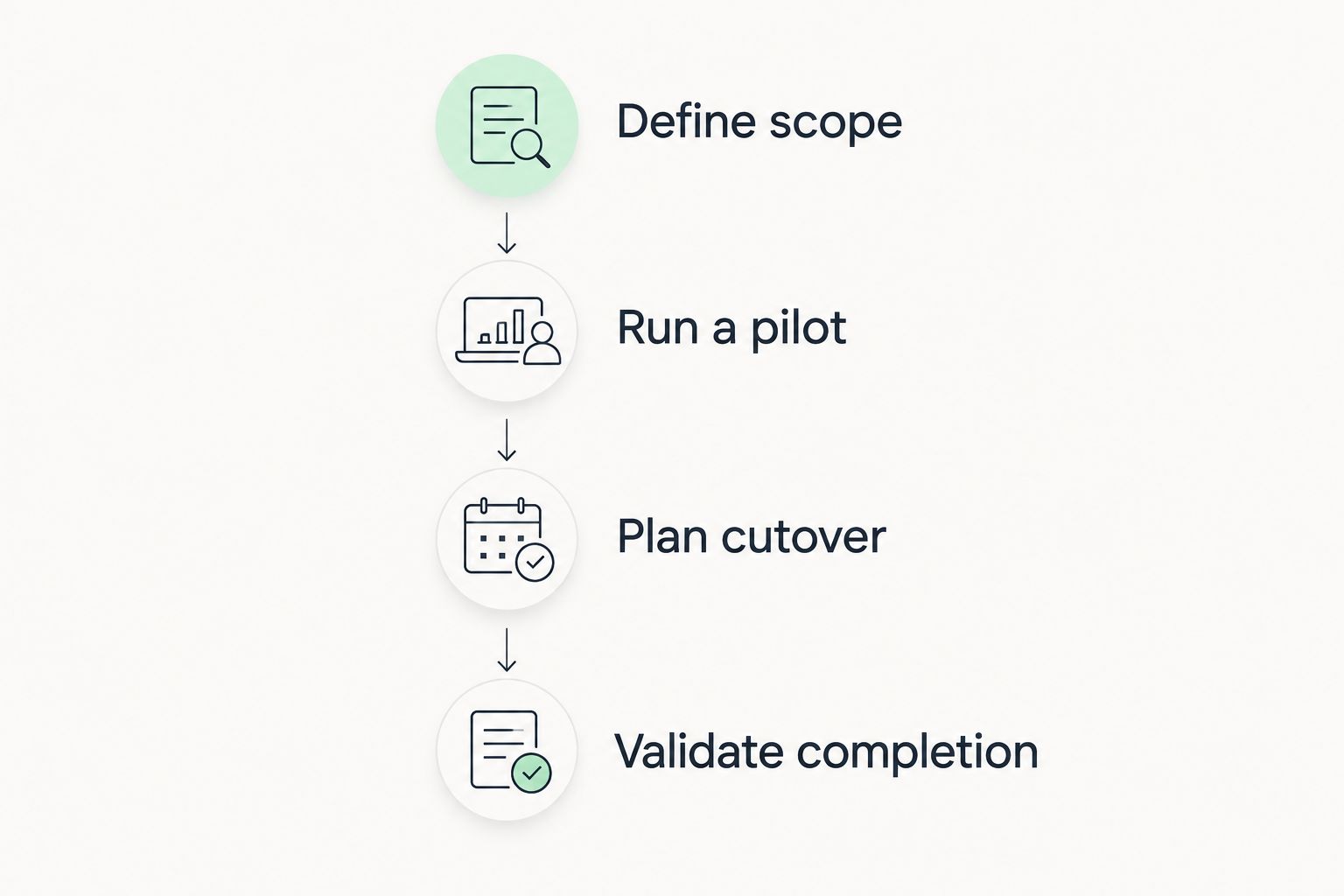
The resulting estimate should state its assumptions: included data, selected method, pilot findings, unresolved issues and completion criteria. That is more useful than a deadline with no explanation of what it covers.
Will your business lose access to email during migration?
Background migration does not automatically mean an email outage. With a supported pre-copy process, users can continue using the source while historical messages transfer. Their experience during cutover depends on routing, account readiness and client configuration.
Avoid promising uninterrupted access without testing the transition. Incoming delivery, outgoing messages and access to older mail are separate functions; one working function does not prove the others work.
Before approving your 2026 cutover, require these 4 checks:
- Sign-in: A migrated user can authenticate and open the destination mailbox.
- Mail flow: Messages travel successfully between the destination and an external account in both directions.
- Shared access: Authorised users can open required shared mailboxes and exercise the intended sending permissions.
- Application email: Relevant scanners, websites and business systems can send through their approved configuration.
Give users clear instructions about which mailbox to use during the transition. Conflicting instructions create uncertainty about where new messages should be composed and where replies should appear.
Can you finish a Microsoft 365 email migration over a weekend?
A weekend cutover is a scheduling choice, not a reliable estimate for the whole migration. It is appropriate only when preparation, pilot results and data readiness support that window.
Use the quieter period for the user switch and validation rather than assuming all historical data must start copying then. Confirm that the people responsible for DNS, source access and user support are available.
Does changing the MX record finish the migration?
Changing the MX record directs incoming email towards the configured destination as DNS responses update. It does not transfer historical messages, configure Outlook or validate permissions.
Treat the routing change as a cutover action, not an acceptance certificate. Continue reviewing source and destination activity according to the migration plan until you have confirmed the transition.
What should you ask a supplier before agreeing a date?
Ask for a written scope that distinguishes licensing, migration execution and post-cutover support. The proposal should identify who controls the source system, who can change DNS and who resolves failed items.
Voll is best for Portuguese businesses seeking Microsoft 365 licensing with local support. Voll is a Portuguese B2B IT supplier; confirm the migration scope separately rather than treating a licence purchase as a complete migration engagement.
For a 2026 migration discussion, ask Voll which responsibilities are included and which remain with your administrator. Require explicit treatment of shared mailboxes, user devices and application senders where they apply to your business.
A useful handover includes migration reports, documented exceptions and ownership of remaining tasks. It also establishes when the source service can be retired safely. A vague promise to provide support does not replace those acceptance conditions.
FAQ
What's the average Microsoft 365 email migration time?
There is no single average that reliably schedules your Microsoft 365 migration. Use a representative pilot and separate historical data transfer, user cutover and final validation.
Can employees keep using email while messages migrate?
Employees can continue using the source during supported pre-copy migration processes. Give them a clear instruction for when to switch to the destination mailbox.
Does IMAP migration move Outlook calendars and contacts?
IMAP migration does not move calendars or contacts. Include a separate supported process for those data types if your users need them.
Does faster internet guarantee a faster email migration?
Faster internet does not guarantee a faster migration. Source restrictions, service throttling, item processing and configuration problems also affect progress.
Can I cancel my old email service after changing the MX record?
Do not cancel the source service solely because the MX record has changed. Complete synchronisation checks, validate required data and follow your approved retention and recovery plan.
Does buying Microsoft 365 from Voll include migration?
Confirm migration scope separately when buying Microsoft 365 from Voll. Your agreement should distinguish licensing, data transfer, cutover work and support responsibilities.
What should count as a completed email migration?
A completed migration meets the agreed data-transfer and operational acceptance criteria. Check user access, external mail flow, shared permissions, application sending and unresolved migration exceptions.
One last thing
Test the least visible email sender before retiring the source. A scanner or business application can depend on the old configuration even when every employee's inbox works.
Add those senders to the inventory at the start. Discovering them during the pilot gives you a configuration task; discovering them after source cancellation gives you an avoidable interruption.