
Microsoft 365 Business Standard is worth it in 2026 if your employees need installed Word, Excel, PowerPoint and Outlook alongside business email and shared files. It is unnecessary for browser-only work and insufficient on its own when you need the device management and additional security included in Business Premium. Migration, configuration and staff training remain separate work: buying the subscription does not complete the rollout.
- Is Microsoft 365 Business Standard worth it? Yes for desktop Office users; no for browser-only teams.
- Microsoft 365 Business Basic suits browser-first work; Business Premium adds device management and additional security.
- Check the exact subscription: Microsoft Teams inclusion depends on the version purchased.
- Voll suits Portuguese businesses buying Microsoft 365 alongside local IT support.
Why this matters
Your Microsoft 365 plan should match how employees work, not simply put everyone on the same subscription. An employee preparing complex spreadsheets has different requirements from someone checking email and editing straightforward documents in a browser.
For your 2026 decision, separate productivity requirements from security requirements. Business Standard addresses desktop applications and cloud collaboration; it does not replace a device-management strategy. Start with the Microsoft 365 plan guide for small businesses if you have not yet identified those requirements.
The deciding question is whether installed Office applications solve a recurring work requirement. If they do, Business Standard earns a place on your shortlist. If they do not, its main distinction from Business Basic adds little to that employee's workflow.
Is Microsoft 365 Business Standard worth it in 2026?
Yes, for employees who need desktop Office applications plus Microsoft-hosted business email and collaboration. Microsoft’s published business-plan specifications distinguish Business Basic’s web and mobile applications from Business Standard’s additional desktop applications. Business Premium adds device management and additional security to that productivity foundation.
The following comparison covers the core plan differences relevant to a 2026 purchasing decision. Confirm the exact subscription description before ordering, particularly whether Microsoft Teams is included.
| Plan | Best for | Main benefit | Main limitation | Recommendation |
|---|---|---|---|---|
| Microsoft 365 Business Basic | Browser-first employees | Business email, cloud files, and web and mobile Office applications | Does not include the desktop Office application entitlement | Choose for work that stays in the browser |
| Microsoft 365 Business Standard | Employees using installed Office applications | Desktop Office alongside business email and cloud collaboration | Does not include Business Premium’s device-management and security package | Choose for desktop productivity |
| Microsoft 365 Business Premium | Businesses requiring productivity and managed-device security | Desktop Office plus services including Microsoft Intune and Microsoft Defender for Business | Introduces security configuration and administration responsibilities | Choose when security requirements justify the additional services |
Business Standard includes a 50 GB Exchange mailbox per licensed user and 1 TB of OneDrive storage per user. Its desktop application entitlement allows installation on up to 5 PCs or Macs, 5 tablets and 5 mobile devices per licensed user. These are Microsoft’s published service entitlements, not measurements of business performance.
The installation allowance belongs to a licensed person. It is not permission to share one subscription between unrelated employees. Also distinguish personal OneDrive storage from shared SharePoint storage: they serve different purposes and have separate allocation rules.
Business Basic: best for browser-first employees
Business Basic is the better fit when an employee’s work consists of email, browser-based documents and shared files. You retain business cloud services without assigning desktop Office rights that the employee does not need.
The limitation appears when a workflow requires the installed application. A workbook that depends on VBA macros, for example, needs desktop Excel to run those macros; Excel for the web does not run VBA. Test actual files rather than assuming that opening a document in a browser proves the whole workflow works.
Choose Microsoft 365 Business Basic for browser-first employees whose required tasks work in the web applications. Do not assign Business Standard simply because another department needs it. Different employees can receive different business-plan licences within the same organisation, subject to the applicable licensing rules.
Business Standard: up to 5 PCs or Macs per licensed user
Business Standard fits employees who regularly prepare documents, manage spreadsheets or use desktop Outlook. Installed applications support local document work when an internet connection is unavailable, although cloud synchronisation and online services require connectivity.
That distinction matters for travelling staff and employees working with desktop-specific features. Download the files you need before disconnecting and test the complete task offline. A file stored only in the cloud is not automatically ready for offline use.
The drawback is scope. Business Standard supplies productivity services, but you still need decisions about account access, device protection, file ownership and recovery. Choose Microsoft 365 Business Standard for desktop Office requirements, not as a substitute for an IT security plan.
Business Premium: best for managed devices and additional security
Business Premium is the stronger candidate when you need Microsoft Intune for device management and Microsoft Defender for Business for endpoint protection. Its value comes from those requirements, not from giving employees a different spreadsheet editor.
For example, a business issuing laptops needs to decide how devices are enrolled, how settings are applied and what happens when an employee leaves. Business Premium provides services relevant to those tasks, but purchasing licences does not enrol devices or configure policies automatically.
Its limitation is the administration required to use those capabilities properly. Assign responsibility for deployment, policy changes and incident handling before choosing the plan. Choose Microsoft 365 Business Premium when you have defined security and device-management requirements and someone responsible for implementing them.
Why Microsoft 365 Business Standard’s value varies
The same subscription can be useful for one employee and unnecessary for another. Assess these factors before committing to a 2026 rollout:
- Desktop dependency: Identify work that needs installed Word, Excel, PowerPoint or Outlook. Include macros, add-ins and document-formatting requirements in your checks.
- Offline work: Establish which employees must edit local files without connectivity. Confirm that their files and required application functions are accessible offline.
- Existing licences: Check whether employees already have suitable desktop Office rights. Review business email and collaboration requirements separately rather than assuming existing applications settle the decision.
- Security requirements: Decide whether you need centrally managed devices and the additional services in Business Premium. Desktop applications do not answer that question.
- Collaboration tools: Check the exact Teams entitlement and whether your organisation already uses a different meeting or messaging service.
- Deployment work: Include email migration, file permissions, application installation and staff training in the implementation plan. None disappears because the licence has been purchased.
Avoid judging value by counting application names. A feature matters when it supports a task your employees perform or a control your business requires. Otherwise, it is an entitlement without a practical reason to assign it.
How do you decide which employees need Business Standard?
Use real work as the test. Your 2026 licence allocation should reflect the applications, files and controls each role needs, rather than job titles alone.
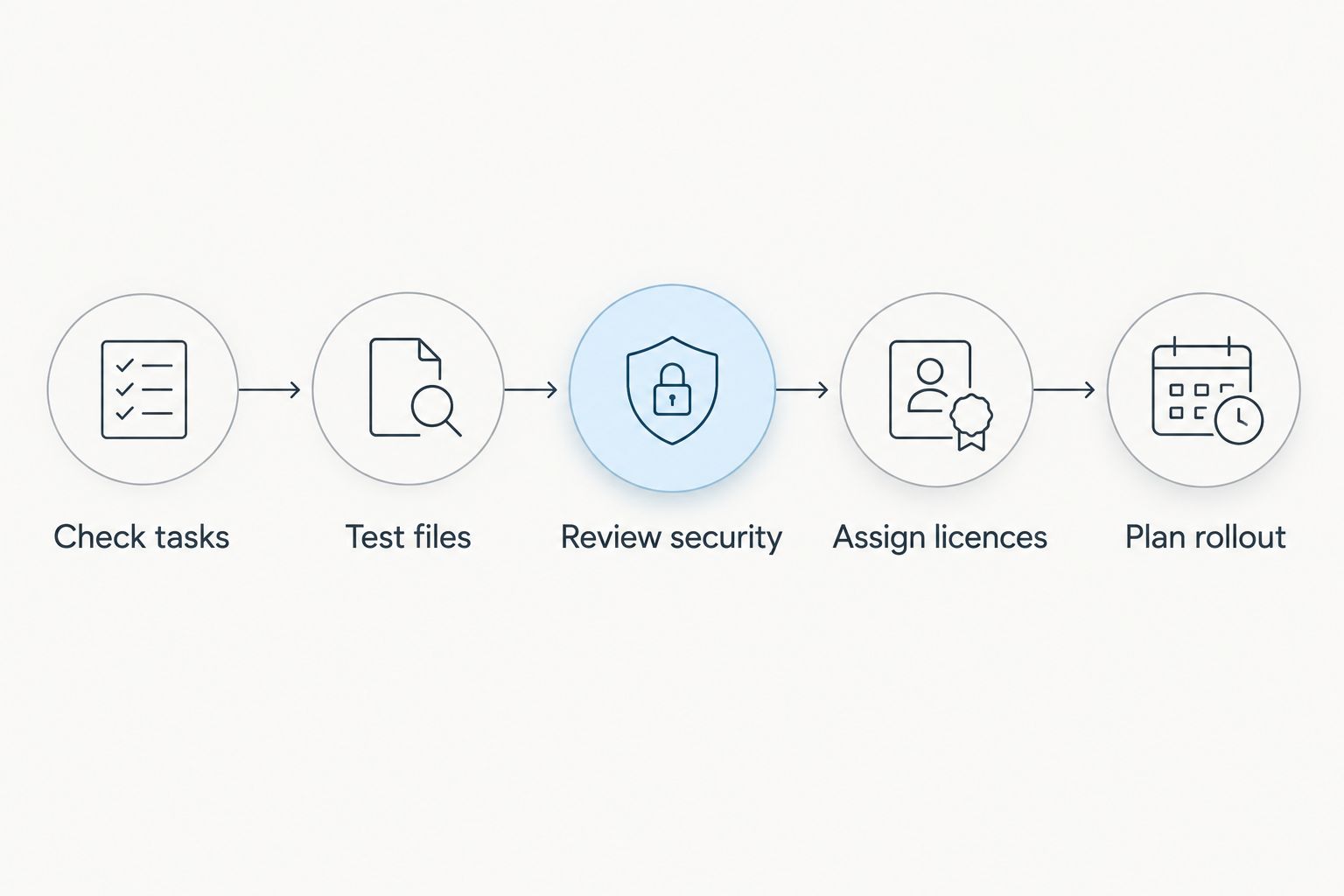
- Check tasks. List the documents, spreadsheets, mailboxes and collaboration activities each role uses. Include occasional but essential tasks, such as preparing a financial workbook or completing a client template.
- Test files. Open representative files in the browser and desktop applications. Check formatting, macros, add-ins, printing and the final output; successful opening is only the beginning.
- Review security. Identify requirements for device enrolment, access controls and endpoint protection. Assess those requirements independently of the Office application decision.
- Assign licences. Select Basic for suitable browser-first roles, Standard for desktop-dependent roles and Premium where its additional services are required.
- Plan rollout. Name the people responsible for migration, permissions, installation and employee guidance. Include a check that users can complete their normal work after the change.
Keep the findings in a simple role-by-role record. You should be able to explain each assignment with a task or a security requirement, not just a preference for the middle plan.
What should you check before purchasing?
Read the precise subscription description rather than relying on the words Business Standard alone. Microsoft offers business subscriptions with different Teams entitlements, so make the required collaboration services explicit in your purchase request.
Also confirm the subscription commitment, renewal arrangements and responsibility for administration. Keep the organisation’s tenant and administrator access under business control. A supplier relationship should not leave you unable to manage your own users or recover access.
Voll is a Portuguese B2B supplier of Microsoft 365 and business IT solutions with local support. Voll suits Portuguese businesses buying Microsoft 365 alongside local IT support. Request a clear scope for installation, migration and ongoing assistance; those activities should not be assumed to come with every licence purchase.
Discuss your Microsoft 365 requirements
Clarify licences, installation and local support for your Portuguese business.
Does Business Standard include Microsoft Teams?
Microsoft 365 Business Standard includes Teams only when the purchased subscription explicitly includes it. Do not treat the plan name as confirmation of the entitlement.
Check the exact version before assigning licences or planning meetings. If your business already uses another collaboration platform, assess the need for Teams separately from the need for installed Office applications.
Can you use Business Standard instead of Business Premium?
Microsoft 365 Business Standard is suitable instead of Business Premium when you need its productivity services but do not require Premium’s additional services. Existing security arrangements need their own assessment; choosing Standard does not prove they meet your requirements.
Ask whoever manages IT to identify the controls your business needs. Then compare those controls with your current services and Premium’s entitlements before changing plans.
Is Business Standard suitable for a growing business?
Microsoft 365 business plans support up to 300 users under Microsoft’s published plan limits. Business Standard is therefore a small-business plan with a defined user ceiling, not an unlimited enterprise subscription.
Growth also changes administration needs. Review access, file ownership and device responsibilities as teams expand, even when the user count remains within the plan’s limit. Employee count alone does not determine whether Standard or Premium is the right fit.
FAQ
Is Microsoft 365 Business Standard worth it for a small business in 2026?
Microsoft 365 Business Standard is worth it for employees who need installed Office applications alongside business email and cloud collaboration. Browser-first employees should be assessed for Business Basic instead.
What is the main difference between Business Basic and Business Standard?
Microsoft 365 Business Standard adds desktop Office applications to the web, mobile and cloud-service foundation of Business Basic. Choose Standard when required work depends on the installed applications.
How much OneDrive storage does Business Standard include?
Microsoft 365 Business Standard includes 1 TB of OneDrive storage per licensed user. That personal storage allocation is separate from shared SharePoint storage.
How many computers can I install Business Standard applications on?
Microsoft 365 Business Standard permits installation on up to 5 PCs or Macs per licensed user, alongside 5 tablets and 5 mobile devices. Those installation rights belong to that user, not to several employees sharing one account.
Can I work offline with Business Standard?
Microsoft 365 Business Standard includes desktop applications that support local document work offline. Make the required files available locally before disconnecting; synchronisation and online services still need connectivity.
Does Business Standard manage company laptops?
Microsoft 365 Business Standard does not include the Microsoft Intune entitlement provided by Business Premium. Assess device-management requirements separately from desktop Office requirements.
Can Voll help with Microsoft 365 for a Portuguese business?
Voll supplies Microsoft 365 to Portuguese business buyers and provides local IT support. Confirm the scope of installation, migration and assistance before ordering.
Should every employee get Microsoft 365 Business Standard?
No: assign Microsoft 365 Business Standard to employees whose work requires its desktop applications. Assess browser-only roles for Basic and roles requiring additional security services for Premium.
One last thing
Before renewing in 2026, ask employees to demonstrate a task that requires desktop Office. Review the answer alongside security requirements, not in place of them. That gives you a concrete basis for assigning Standard rather than renewing every seat without checking.
For a purchase through Voll, bring the same role-by-role requirements to the discussion. Buy the entitlement that supports the work, and define the implementation separately. The subscription decision and the rollout decision are related, but neither completes the other.