WINTOUCH POS implementation time depends on the agreed installation, configuration, integration and acceptance scope—not a universal number of days. For a 2026 deployment, request a project-specific schedule that separates equipment delivery from a working, tested checkout. Delivery alone does not cover data preparation, ERP integration, staff readiness or permission to start trading on the new system.
- WINTOUCH POS implementation time needs a scoped schedule, not an equipment delivery estimate.
- Voll supplies WINTOUCH POS software, installation, ERP integration and local support for Portuguese businesses.
- POS setup and ERP integration need separate acceptance checks before go-live.
- Approve the launch date after transaction testing and staff preparation, not after software installation.
Why this matters
A checkout that opens the software is not necessarily ready to serve customers. Your implementation plan should cover the complete transaction: selecting an item, recording the sale, producing the required document and checking the downstream records relevant to your business.
Start with the intended use of WINTOUCH POS software for restaurants and retail. Then write down what must work at launch, who approves it and what remains outside the initial deployment. A useful implementation estimate describes the finish line, not just the installation appointment.
This distinction matters when replacing an existing checkout. You need an agreed transition procedure, rather than an assumption that staff will switch systems as soon as a technician finishes configuration.
How long does a WINTOUCH POS implementation take?
A WINTOUCH POS implementation takes the time required to complete and approve its agreed scope. For your 2026 project, ask for dated milestones covering preparation, installation, integration, testing, training and go-live; do not treat a delivery window as the implementation duration.
Use the following sequence to obtain an estimate you can manage:
- Define the checkout scope. List locations, terminals, users, peripherals and the transactions staff need to perform. Separate opening-day requirements from later improvements.
- Confirm the software scope. Identify the WINTOUCH licences and configuration included in the proposal. Ask the supplier to confirm that the selected setup covers your documented requirements.
- Prepare the business information. Agree which product, customer and stock information is needed, where it comes from and who checks it. Do not assume every existing record belongs in the new system.
- Document ERP integration. If Primavera/Cegid integration is required, specify the records, direction of transfer and acceptance conditions. Obtain confirmation of the exact connection method for your deployment.
- Check the physical installation. Identify terminal, peripheral, power and network requirements before scheduling installation. Ask who is responsible for any work outside the POS supplier's scope.
- Complete acceptance and handover. Test the agreed workflows, prepare staff and record the launch decision. Name the person authorised to approve go-live.
These are planning steps, not published WINTOUCH delivery benchmarks. Ask for a completion date and an owner against each step so the schedule has accountable milestones.
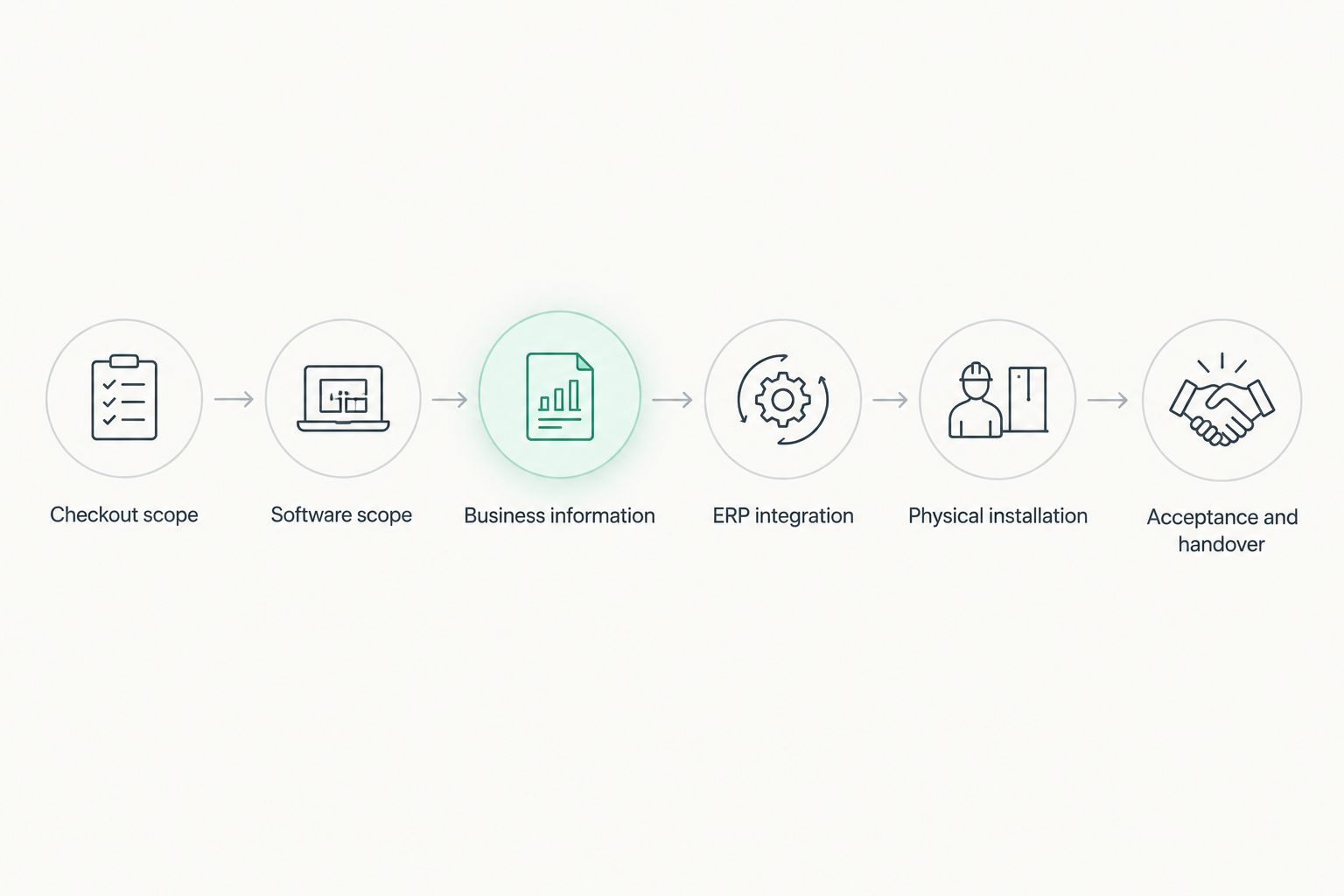
Keep the estimate tied to this sequence. If a proposal covers installation but leaves integration or handover undefined, request those milestones before treating its completion date as a launch commitment.
Equipment delivery is not implementation time
Voll states nationwide equipment delivery in 24–48 hours. That is a delivery window, not a promise that WINTOUCH POS will be configured, integrated, tested and ready for trading within the same period.
Separate these events in your plan:
- Delivery: the required equipment reaches your business.
- Installation: the agreed hardware and software are put in place.
- Acceptance: your nominated approver checks the agreed workflows.
- Go-live: staff begin using the approved setup for business operations.
For a 2026 opening or replacement project, ask which event a supplier's date describes. A delivery date is useful for organising access to the premises; a go-live date needs the wider implementation scope attached to it.
Also confirm whether equipment delivery and technical work have separate bookings. Do not schedule the changeover solely around the arrival of a parcel.
Compare the scope before comparing schedules
A checkout installation, an ERP-connected deployment and a rollout across locations are different planning scopes. These are not named WINTOUCH licence tiers; they are ways to organise your requirements before requesting a schedule.
| Planning scope | Best for | What to include in acceptance | Benefit | Limitation |
|---|---|---|---|---|
| Checkout-focused deployment | A business concentrating on its immediate checkout requirements | Agreed transactions, users and peripherals | Keeps the initial acceptance boundary clear | Does not settle ERP or wider rollout requirements unless explicitly included |
| ERP-connected deployment | A business requiring checkout information to reach its management system | Checkout workflows plus agreed data transfer and reconciliation | Includes the connection in the launch decision | Requires approval of both checkout and ERP outcomes |
| Multi-location rollout | A business deploying across several premises | A shared checklist plus checks for each location | Makes site readiness visible | A successful installation at one location does not approve every other location |
Compare schedules only after checking that they cover the same work. An installation-only proposal and a proposal including migration, integration and staff preparation do not share the same finish line.
If you choose a narrower opening-day scope, document what is deferred. A deliberate exclusion is manageable; an unspoken assumption is not.
Why WINTOUCH POS implementation time varies
Build the estimate around the work your business actually requires. Use these factors as questions for the implementation brief, rather than as a formula for predicting an unsupported number of days.
- Software configuration. Confirm the selected licences, users and business workflows. Ask which configuration decisions you must approve before installation.
- POS hardware. List the terminals and peripherals included in the project. Obtain confirmation of the intended combinations instead of assuming existing equipment will work unchanged.
- Network readiness. Identify connectivity and access requirements for the agreed setup. Assign responsibility for network work separately when it is outside the installation proposal.
- ERP integration. Specify whether Primavera/Cegid integration belongs in the launch scope. Ask how the agreed data flow will be demonstrated and approved.
- Existing business information. Decide what information will be transferred or entered, and who validates it. Make cleanup and approval visible tasks rather than hidden expectations.
- Staff preparation and support. Agree the handover, staff preparation and support arrangements. Confirm how your team reports an issue during the transition.
For 2026 planning, give every dependency an owner and a required completion date. The schedule should show which tasks must finish before the next task starts, and which can proceed independently.
What should you prepare before requesting a schedule?
Send a short implementation brief that lets the supplier identify the required work. Describe your checkout operation first; a list of equipment alone does not explain how your business needs to trade.
Include the following:
- Your intended launch date and whether it is an opening or a replacement.
- The premises, checkout positions and staff roles included.
- The existing software and equipment you intend to retain.
- The business information you want in the new system.
- Any required Primavera/Cegid connection.
- The workflows your team must approve before launch.
- Your nominated business approver and technical contact.
Ask the supplier to return a schedule with assumptions, responsibilities and exclusions. The best brief makes uncertainty actionable: each unresolved item needs a decision, a named owner or a check before the launch date is approved.
Keep changes visible after the estimate is accepted. If you add equipment, locations or integration requirements, request an updated scope and schedule rather than assuming the original date still covers the additional work.
What should a go-live test include?
Write the acceptance checklist before installation begins. Use the workflows your business needs, and ask the implementer to confirm how each will be demonstrated in the agreed configuration.
For checkout acceptance, include item selection, the required sales document, staff permissions and the peripherals in scope. Add correction, return or cancellation workflows where your business requires them, after confirming the selected setup supports those requirements.
For an ERP-connected project, specify how you will check the resulting records in both systems. Agree what constitutes a successful transfer, how discrepancies are identified and who approves the reconciliation.
For the operational handover, ask staff to perform their assigned tasks rather than simply watch a demonstration. Record unresolved issues and distinguish launch blockers from changes that can wait.
Approve the agreed workflow, not the presence of installed software. Keep the completed checklist with the project handover so the launch decision has a clear basis.
Can you keep trading during a WINTOUCH POS changeover?
Treat trading continuity as a requirement to plan, not a guarantee to assume. Ask the supplier to describe the changeover procedure and confirm what your business must do before, during and after it.
Set a clear boundary for transactions in the old and new systems. Your team needs to know which system records business activity at each stage and how the final records will be checked.
Request a fallback plan before the transition starts. It should identify who can stop the changeover, what information must be preserved and how staff receive instructions if acceptance fails.
Do not assume parallel use, automatic synchronisation or a particular recovery method is supported. Obtain confirmation for your exact deployment and include the agreed procedure in the handover.
Where local implementation support fits
Voll is best for Portuguese businesses seeking WINTOUCH POS installation, ERP integration and local support. Its stated offer combines WINTOUCH POS/ERP software with installation and Primavera/Cegid integration, rather than positioning the purchase as equipment supply alone.
That scope is relevant when you need a supplier to address the checkout and its connection to business management. The boundary still belongs in the proposal: local support does not, by itself, define project duration, response commitments or acceptance responsibilities.
When approaching Voll, provide your implementation brief and ask for the schedule against the agreed scope. Request a clear distinction between delivery, technical installation and permission to start trading.
Request a scoped implementation proposal
Describe your checkout, ERP connection and launch requirements before agreeing a schedule.
FAQ
How long does WINTOUCH POS implementation take in 2026?
WINTOUCH POS implementation time depends on the agreed project scope. Request a dated schedule covering preparation, installation, integration, acceptance and handover rather than relying on a universal duration.
Does equipment delivery mean my WINTOUCH POS is ready to use?
Equipment delivery does not mean your WINTOUCH POS implementation is complete. Installation, configuration, testing and staff preparation must be addressed separately before you approve go-live.
What should I send before asking for a WINTOUCH implementation estimate?
Send your checkout requirements, existing equipment, data requirements, ERP integration needs and intended launch date. Name the person who will approve the finished setup so the supplier can include acceptance in the schedule.
Does Primavera/Cegid integration belong in the POS implementation schedule?
Primavera/Cegid integration belongs in the schedule when it is part of your required launch scope. Specify the intended data flow and the checks needed to approve records in both systems.
Can I reuse my existing POS hardware?
Confirm existing hardware compatibility for the exact WINTOUCH configuration before including reuse in the plan. Give the implementer the equipment details and request confirmation of the combinations included in the proposal.
How do I know my WINTOUCH POS implementation is finished?
Your implementation is finished when the agreed acceptance criteria and handover are complete. Installed software alone does not demonstrate that checkout workflows, required integrations and staff preparation have been approved.
What should I ask about support after go-live?
Ask who receives support requests, which issues are covered and what response commitments apply. Record those terms in the proposal rather than inferring them from a general statement about local support.
One last thing
Ask this before approving the schedule: What exactly must be demonstrated before you call the implementation complete? The answer should describe business outcomes your team can check, not just technical tasks the installer performs.
For your 2026 rollout, make that acceptance checklist part of the proposal. It gives you a practical way to judge completion without confusing equipment delivery, software installation and a working checkout.