To establish your WINTOUCH POS cost in 2026, request a quote for the exact licence and the work needed to put it into use. Keep installation, ERP integration, hardware and support separate from the software line, and confirm whether each is included before comparing offers.
- WINTOUCH POS cost should be assessed against a named licence and a written implementation scope.
- Voll supplies WINTOUCH POS licences, installation, ERP integration and local support for Portuguese businesses.
- Separate software licensing from POS hardware, installation and support when comparing quotes.
- Confirm VAT treatment, payment terms and any renewal obligations before approving your purchase.
How much does WINTOUCH POS software cost in 2026?
Use a scoped quote, not a generic POS figure, to establish what your business will pay. Start with the exact licence reference, then identify everything needed to make that licence usable in your operation. The WINTOUCH POS software for restaurants and retail guide provides a starting point for defining the business use case.
Ask the supplier to complete this breakdown. Treat every inclusion as something to confirm in writing, rather than assuming that a software purchase includes a complete checkout installation.
| Quote component | What you need confirmed | Why it belongs in the breakdown |
|---|---|---|
| Software licence | Exact reference, permitted use and applicable terms | Identifies what you are actually purchasing |
| Installation | Tasks included and responsibility for completion | Separates the licence from deployment work |
| ERP integration | Required connection, data scope and testing | Defines the work beyond the POS itself |
| POS hardware | Equipment included, reused or purchased separately | Prevents software and equipment from being confused |
| Support | Covered tasks, contact arrangements and exclusions | Clarifies what happens after installation |
| Tax and payment | VAT treatment, payment schedule and invoice details | Makes business purchasing terms explicit |
A useful quotation lets you trace every requirement to an included item or a stated exclusion. If a requirement appears nowhere, ask the supplier to address it before you approve the order.
Why this matters
A software licence and a working checkout are different purchasing scopes. You need to know which one the offer covers. Comparing them as though they were identical hides differences in equipment, setup responsibilities and ongoing assistance.
For your 2026 purchasing decision, define the outcome first: what must staff be able to do when the installation is handed over? Then ask the supplier to connect that outcome to the licence, equipment and services proposed. This makes the quote easier to evaluate without treating a product name as proof that every requirement is included.
Keep the comparison fair. An offer containing installation and an ERP connection should not be assessed against a licence-only offer until you have identified who will perform the additional work in the latter case.
Licence-only purchasing versus a deployment with services
These are purchasing scopes to discuss with a supplier, not named WINTOUCH packages or confirmed licence tiers. Choose the scope that matches the work you can take responsibility for internally.
| Purchasing scope | Best for | Advantage | Limitation to resolve |
|---|---|---|---|
| Licence-only purchase | Businesses with a defined specification and deployment resources | Keeps the software purchase distinct from services | You must assign installation, testing and support responsibilities |
| Licence with installation | Businesses needing help putting the software into use | Places deployment tasks in the purchasing discussion | Installation needs a written boundary and acceptance criteria |
| Licence with ERP integration | Businesses requiring a connection to their existing ERP | Brings the connection into the project scope | Data handling and testing responsibilities need agreement |
| Licence, equipment and services | Businesses planning a checkout installation together | Allows software, hardware and implementation to be assessed together | Each component still needs an itemised description |
Choose licence-only purchasing only when you can name who owns the remaining work. An internal IT team or an existing service provider can fill that role, but the responsibility should be explicit.
For a deployment with services, ask what the supplier will deliver and what your business must prepare. A broad description such as installation is not an acceptance checklist. Specify the tasks, the handover conditions and any dependencies on existing systems.
Why your WINTOUCH POS purchasing scope varies
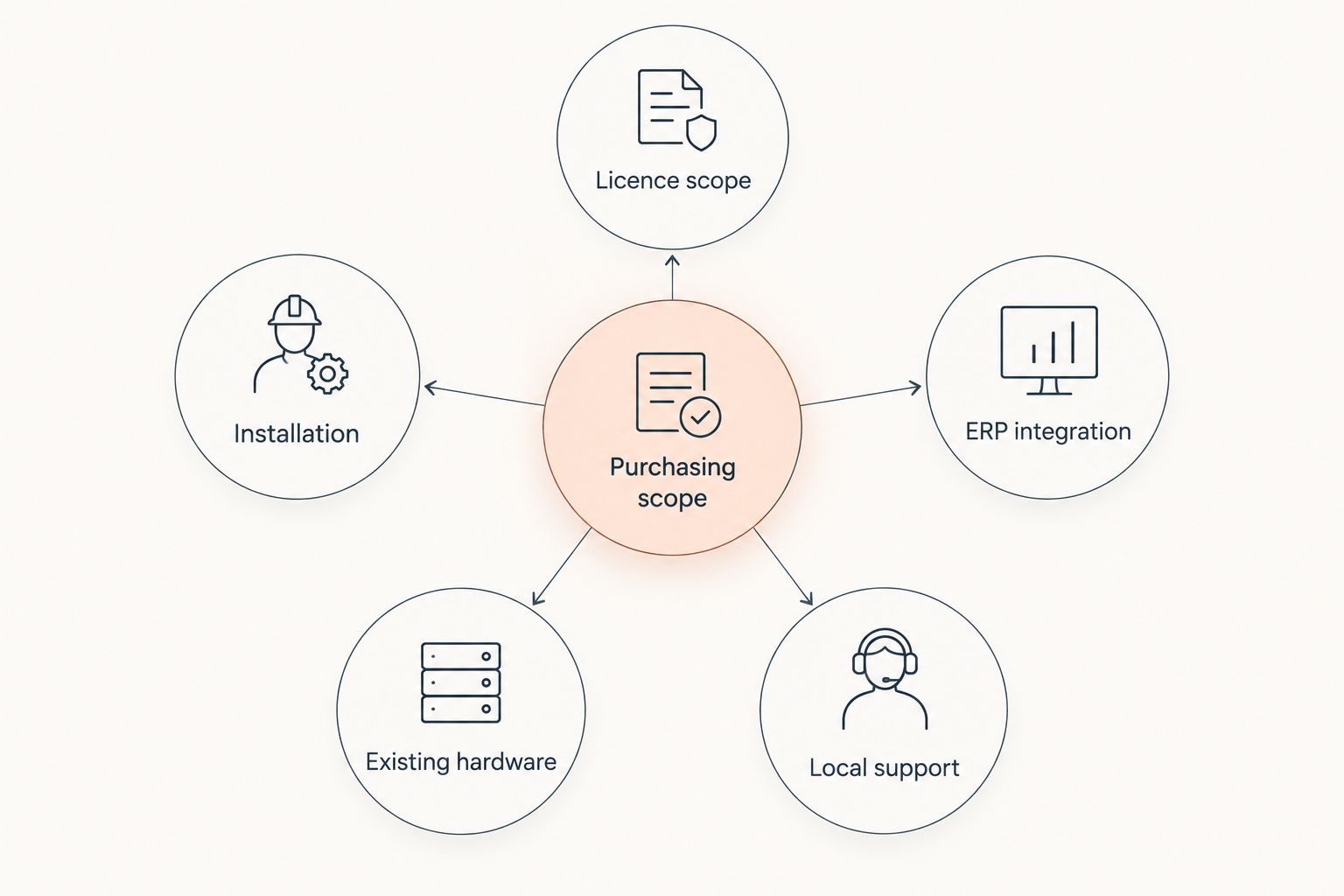
The useful question is not just which licence to buy. It is what you need alongside that licence. These factors define the scope you should put in front of a supplier:
- Licence scope: Ask for the exact reference and terms that match your intended use. Do not infer rights or included functions from the WINTOUCH name alone.
- Installation: Specify whether you need software setup, equipment configuration or a broader handover. Ask the supplier to distinguish these tasks.
- ERP integration: Identify the existing ERP and the required connection. Request a written description of the data and processes involved.
- Existing hardware: List the equipment you intend to retain. Have the supplier confirm suitability before treating reuse as an agreed part of the project.
- Local support: Describe the assistance your staff need after deployment. Confirm covered tasks and exclusions rather than assuming support means everything.
The diagram below separates those decisions. It is a scope checklist, not a statement that every WINTOUCH licence includes the same services or equipment.
How do you request a WINTOUCH POS quote you can compare?
Give each supplier the same brief. A comparable brief should describe your business requirements without prescribing an unverified licence or assuming that an existing device will work.
- Describe the checkout operation. Explain what staff need to do during a sale and at handover. Separate essential requirements from features you would merely like to explore.
- List the existing equipment. Provide device models and the peripherals you want to retain. Ask for compatibility confirmation against the proposed configuration.
- Identify the existing ERP. Name the system and describe what must pass between it and the POS. Request confirmation of the supported connection and implementation responsibilities.
- Request the licence reference. Ask the supplier to identify the exact product being proposed and provide the applicable licensing terms.
- Separate services and obligations. Request distinct descriptions for installation, integration and support. Ask which obligations end at handover and which continue afterwards.
- Agree acceptance criteria. Describe the checks your business will use to accept the installation. Record unresolved requirements before approving the purchase.
Include your legal business details and request a quotation dated for your 2026 decision. Check the validity period stated by the supplier; do not assume an old offer remains applicable.
Voll is best suited to Portuguese businesses buying WINTOUCH POS licences with installation, ERP integration and local support. Its stated business offering includes those services and integration with Primavera/Cegid. The purchasing limitation is that you still need a written quote confirming the exact licence, deliverables and support terms for your own project.
You can use Voll to explore business purchasing and request a quote. Specify the required scope rather than asking only for WINTOUCH POS.
Request a scoped WINTOUCH quote
Identify your licence needs, existing equipment and ERP integration requirements before purchasing.
How should you compare WINTOUCH POS quotes in 2026?
Compare matching deliverables first. Put the licence references, services and exclusions beside each other before making a decision based on the final quotation.
Use the same evaluation period for any continuing obligations. For example, ask suppliers to describe what is payable or required over 12 months, 24 months and 36 months. These are comparison windows you choose, not WINTOUCH contract durations or published commercial terms.
Within each window, identify which obligations are one-off and which recur under the proposed agreement. Ask whether updates, support or other continuing services are included, optional or separately contracted. Do not label the licence a subscription or a perpetual purchase until the supplied terms establish that distinction.
Record these checks beside each offer:
- Does the licence reference match the intended use?
- Are the same installation tasks included?
- Is the required ERP connection addressed?
- Is equipment included, excluded or subject to confirmation?
- Are support responsibilities defined?
- Is the tax basis clear?
- Are any continuing obligations documented?
An unresolved item is a question for the supplier, not a reason to invent an allowance. Ask for clarification and then update the comparison.
What should you check about VAT and business purchasing?
Voll states that its business pricing is presented without VAT. Keep that tax basis explicit when reviewing a WINTOUCH POS quotation, and ask for the invoice treatment applicable to your purchase.
Do not treat an amount excluding VAT as the final invoice total. Equally, do not assume that every Portuguese business purchase uses the same tax treatment. Confirm your business details and the supplier's invoicing basis with the appropriate finance contact.
For a 2026 approval request, present the quotation on the basis your finance team requires. Keep the supplier's tax wording attached so the person authorising the purchase can distinguish the software and service scope from the invoice treatment.
Does a WINTOUCH POS licence include hardware?
Treat hardware as a separate purchasing line unless the quotation explicitly includes it. A reference to POS software does not establish that a terminal, receipt printer, scanner or cash drawer forms part of the offer.
If you want to reuse equipment, provide its exact identification and request written compatibility confirmation. If you need new equipment, ask the supplier to list each device rather than relying on a general description such as complete POS.
Is Primavera/Cegid integration included with WINTOUCH POS?
Include Primavera/Cegid integration in your brief, but confirm its inclusion in the quote. A supplier offering integration services does not mean every licence purchase includes that work.
Describe the connection you require and ask who owns configuration, testing and issue resolution. Agree the expected result before installation, not after discovering that the POS and ERP have different responsibilities.
What should you confirm about support before purchasing?
Confirm the support scope in writing before you approve the licence. Ask what assistance is included, how to request it and which tasks require a separate agreement.
Distinguish help with the software from work on equipment or an ERP connection. Also establish who handles issues involving more than one supplier; an unclear handoff leaves your business responsible for coordinating the resolution.
FAQ
How do I find my WINTOUCH POS cost in 2026?
Request a quote identifying the exact WINTOUCH licence and implementation scope. Ask for installation, ERP integration, hardware and support to be described separately, with tax and payment terms confirmed.
Can I compare a WINTOUCH licence with a complete POS installation?
Compare them only after separating the software, equipment and service deliverables. A licence-only purchase leaves you responsible for assigning any deployment work that the offer excludes.
Does WINTOUCH POS come with a terminal and receipt printer?
Treat the terminal and receipt printer as separate items unless the quotation explicitly includes them. Request an equipment list and compatibility confirmation for anything you intend to reuse.
Does Voll offer WINTOUCH POS installation and local support?
Voll describes installation and local support as part of its specialist business offering. Ask your quotation to confirm the tasks, handover conditions and support coverage applicable to your purchase.
Is ERP integration automatically included when I buy WINTOUCH?
Do not assume ERP integration is included in a WINTOUCH licence purchase. Identify the existing ERP and request explicit confirmation of the connection, testing and responsibilities in your quote.
Are Voll's business figures shown with VAT included?
Voll states that its business pricing is shown without VAT. Confirm the applicable invoice treatment and final tax basis before approving your purchase.
What should I send when asking for a WINTOUCH POS quote?
Send your checkout requirements, existing equipment details and ERP integration needs. Request the exact licence reference, an itemised service scope and written acceptance criteria.
One last thing
Ask who owns the checkout at handover. The answer should name the party responsible for proving that the agreed software, equipment and integration work together as specified.
For your 2026 purchase, attach that responsibility to the quote. A clear acceptance checklist gives you something more useful than a broad promise: a defined point at which the supplier's work is complete and your team can take over.