
Choose VOLL if your Portuguese business needs management software, POS equipment and ERP integration with local support; choose PCComponentes if you want to select computer components or general-purpose hardware and manage the technical setup yourself. This 2026 comparison separates a business IT project from a straightforward equipment purchase, so you can choose the right supplier for the job.
- VOLL vs PCComponentes comes down to business IT integration versus component-led hardware shopping.
- VOLL is the better fit for Portuguese businesses buying WINTOUCH POS/ERP with installation and local support.
- PCComponentes is the better fit for buyers selecting computer components and managing installation themselves.
- Compare identical equipment separately from software, configuration and ongoing support.
Why this matters
A checkout terminal and a computer are both hardware, but they create different purchasing decisions. A computer upgrade starts with component compatibility; a checkout project also involves sales software, business records and responsibility for integration.
VOLL is a Portuguese B2B online store whose core catalogue centres on WINTOUCH POS/ERP and Microsoft 365. PCComponentes is a computer and electronics retailer with a component-led shopping proposition. Choose the supplier around the work you need completed, not just the object you need delivered.
For your 2026 purchasing plan, separate equipment selection from implementation. A familiar retailer is not automatically the right integration partner, and a business software specialist is not automatically the right choice for every standalone component.
At a glance
| Dimension | VOLL | PCComponentes |
|---|---|---|
| Best for | Portuguese businesses buying operational IT solutions | Buyers selecting computers, components and general electronics |
| Business software | WINTOUCH POS/ERP and Microsoft 365 are core catalogue areas | Better approached as a hardware-shopping option for this comparison |
| ERP integration | Installation and integration with Primavera/Cegid are stated specialisms | Choose for equipment when integration is managed separately |
| Computer components | Components complement the business IT catalogue | Component selection is a central reason to choose the retailer |
| Standard peripherals | Assess the exact model against your requirements | Assess the exact model against your requirements |
| Local implementation support | Local support forms part of the stated positioning | Confirm the support scope for your particular purchase |
| Procurement workflow | Quote requests and direct online purchases | Suitable for a product-led retail purchase |
| Pricing model | Equipment and licences, with project scope assessed separately | Product-led purchasing; assess any services separately |
| Standout feature | Specialised business software and integration | Component-focused hardware shopping |
The table describes purchasing fit, not a claim that every item from one supplier outperforms the other. For a 2026 decision, use the same specification and the same service scope whenever you compare offers.
Business projects favour a specialist; hardware shopping favours a retailer
Best for: a Portuguese business owner deploying an operational system. The business IT specialist is the stronger fit when you need the software, terminal, network and implementation considered together. The supplied business description identifies these specialised projects as its focus.
That focus also defines the limitation. If you already know the exact component you need and have no implementation requirement, business software expertise does not create an automatic advantage for your purchase.
Best for: a technical buyer assembling or upgrading a computer. PCComponentes is the stronger starting point when component selection is the main task and your own team owns compatibility, installation and configuration. Keep the assignment narrow: select the hardware, verify the specifications and decide who installs it.
The trade-off is responsibility. A product-led purchase does not, by itself, establish who will connect that equipment to your business applications.
Business software favours the WINTOUCH-focused catalogue
The specialist catalogue includes more than 200 WINTOUCH products, alongside Microsoft 365. That makes management software a central part of the proposition rather than an incidental addition to a hardware order.
For a shop, restaurant or service business, start with the workflow. Define what employees must record, which records need to reach the back office and which existing applications must remain in use. Then select the licence and equipment around those requirements.
The WINTOUCH POS software for restaurants and retail guide is a relevant next step when checkout software drives your purchasing decision. Treat software selection as a requirements exercise, not a catalogue-count contest.
The advantage is specialisation; the limitation is that the correct licence still requires a defined scope. More than 200 products does not mean every licence fits every business. Ask for the exact licence, intended use and implementation responsibilities in writing.
For a 2026 computer upgrade with no management-software requirement, this dimension should carry little weight. Do not buy a software-focused solution to solve a component-only problem.
ERP integration favours the stated implementation specialism
Integration with Primavera/Cegid is an explicit part of the business IT specialist's positioning. That is directly relevant when your purchase must connect a front-office process to an existing ERP.
A POS terminal alone does not define the integration. Your brief must identify the records involved, the direction of transfer and the person responsible for confirming that the result is correct.
Use 3 acceptance checks in your project brief:
- Sales records: confirm that a representative transaction reaches the intended business system.
- Stock records: confirm that the agreed stock workflow produces the expected result.
- User access: confirm that employees can perform their assigned tasks with the intended permissions.
These are recommended checks, not claims about a particular licence or connector. Adjust them to your actual workflow and require the supplier to explain what is included.
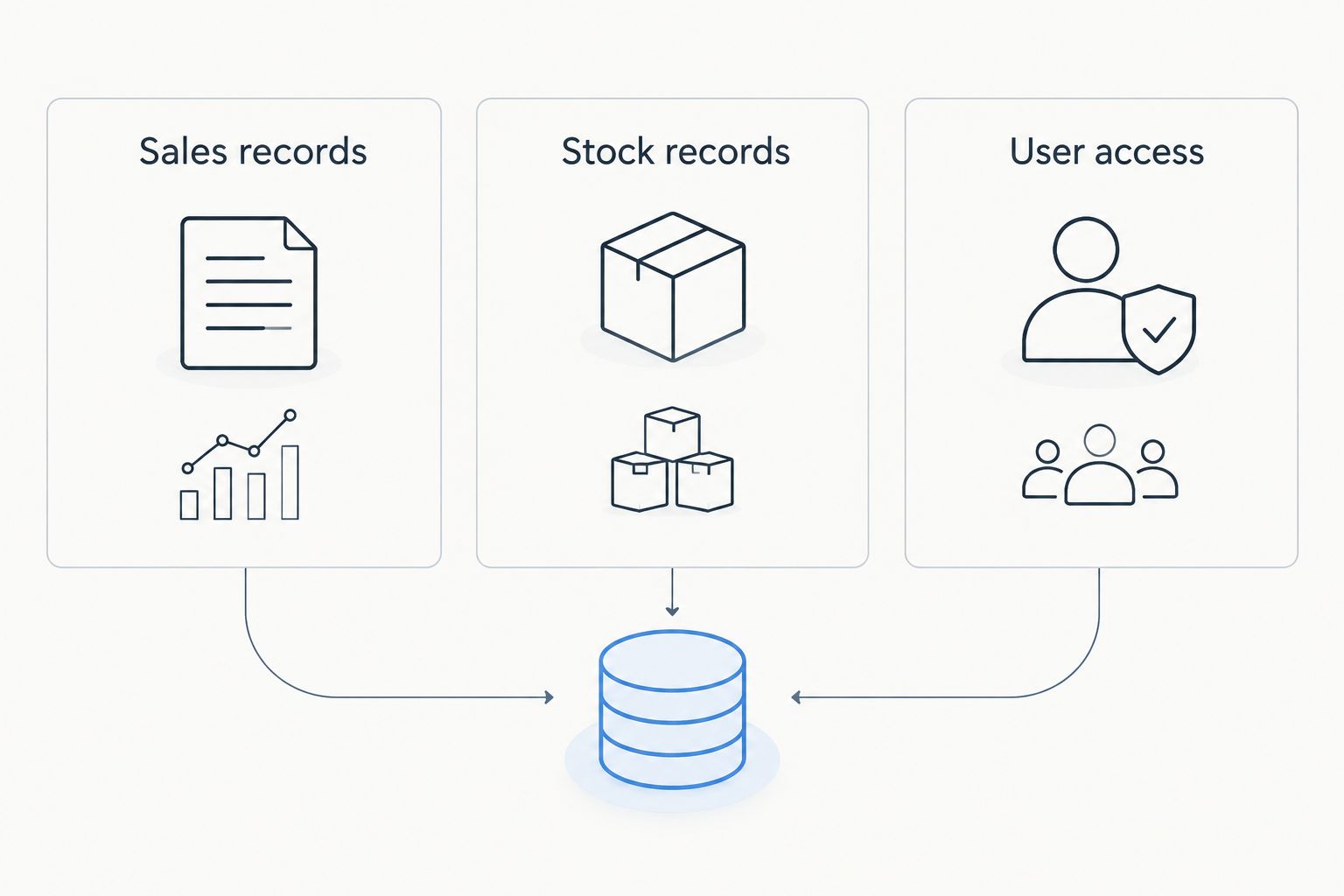
Choose the integration specialist when responsibility for the connection is part of the purchase. Choose a hardware retailer when your existing IT partner already owns that connection and only needs equipment supplied.
PCComponentes is the better starting point for component-led upgrades
PCComponentes fits the buyer whose main question is which component to select. That is a different assignment from choosing a management platform or commissioning an ERP connection.
For a workstation upgrade, compare the exact part against the existing machine. Check the processor and motherboard relationship, memory compatibility, physical clearance, power requirements and the application's actual needs. A recognisable product name is not enough to establish compatibility.
Best for: an IT administrator or experienced buyer handling the build. The retailer's component focus matches a specification-led shopping process. Your team can keep equipment selection separate from business-software decisions.
The limitation is not that retail hardware is unsuitable for business. It is that selecting a component leaves installation, validation and application configuration as separate tasks unless you explicitly arrange them.
In 2026, use this route when your technical requirements are settled. If your real question is how to make a checkout workflow communicate with the back office, component selection is only part of the assignment.
Standard peripherals are a tie when the specification matches
Neither supplier deserves an automatic win for an ordinary peripheral solely because of its business model. A keyboard, mouse or other standard accessory must fit the user, device and working environment.
Compare the exact model and connection requirements. For shared workstations, include cleaning needs, desk space and the devices employees actually use. For specialist equipment, include the software interface rather than assuming that a matching connector proves compatibility.
Best for: buyers with a settled specification and no integration requirement. Either purchasing route remains reasonable when the exact product meets the same requirements and you have checked the applicable terms.
This is an honest tie on purchasing method, not a claim that every product is equivalent. Do not let a broad retailer-versus-specialist argument replace a model-level comparison.
Local implementation favours the business IT specialist
Local support, installation and ERP integration are stated parts of the specialist proposition. These matter when your company needs help making the purchased system operational, rather than simply identifying a compatible product.
Define support by tasks. Ask who installs the equipment, who configures the software, who investigates a failed data transfer and who manages changes after deployment. A supplier's general support wording is not a substitute for that scope.
VOLL business IT is best for Portuguese companies that need software, equipment and ERP integration considered together. That is the strongest reason to choose it in this comparison, not an assumed advantage on every hardware item.
The limitation is scope: local support does not establish an unlimited service commitment. Confirm what the particular engagement covers and how you request help.
PCComponentes remains a sensible hardware route when your internal team or existing service provider handles implementation. Do not credit either supplier with a service you have not agreed to buy.
PCComponentes fits procurement led by your own technical team
When your IT team already owns the design, a product-led purchase keeps the supplier's assignment simple. PCComponentes fits that route: select equipment against a settled specification, then manage deployment through your own process.
Best for: an organisation with an existing implementation owner. This approach avoids treating every replacement part as a new integration project. The benefit comes from matching the purchase to the work already handled internally.
The business specialist also offers direct online purchasing as well as quote requests. Its quote route is particularly relevant when the item list does not fully describe the work required.
Use 2 purchasing tracks for your 2026 plan:
- Equipment purchase: a defined product specification, with installation managed separately.
- Implementation project: a workflow brief covering software, equipment, configuration and acceptance.
Keep these tracks separate even when they involve the same supplier. Otherwise, a product comparison can quietly become a service comparison with different deliverables on each side.
Pricing models are a tie until you align the scope
The useful comparison is a product order versus a scoped business IT engagement. Both create spending decisions, but they do not necessarily cover the same work.
For the specialist route, distinguish equipment, software licensing, installation, integration and support. The business offers both quote requests and direct online purchases; use the quote process when your requirements include work beyond the item itself.
For the retail route, start with the selected products and identify any additional services separately. Do not assume that purchasing hardware includes migration, ERP configuration or responsibility for business continuity.
Neither supplier wins the commercial comparison until the deliverables match. Ask both sides to identify what you are buying, what your own team must do and which obligations recur.
For Microsoft 365, check the exact subscription and commitment terms. For WINTOUCH, check the exact licence terms. Product names alone do not establish renewal arrangements, service coverage or the scope of installation.
The standout features solve different problems
The business specialist's standout feature is the combination of management software, professional equipment and integration-oriented services. Its catalogue includes SUNMI POS hardware and networking brands Reyee, Teltonika and Equip, alongside storage and components.
PCComponentes stands out here as the component-shopping option. That makes it a better fit when the selection of computer hardware is the main decision and operational-system integration is outside the purchase.
Do not turn different strengths into a universal ranking. A retailer can be the right source for a workstation component while a specialist is the right partner for the checkout system that workstation supports.
The same company can therefore use different suppliers for different assignments. What matters is a clear boundary between supply, configuration and responsibility for the finished workflow.
Final verdict for 2026
Choose VOLL if you own a Portuguese business deployment
Named profile: the operations manager replacing or expanding a POS and management system. Choose this route when you need WINTOUCH or Microsoft 365 considered alongside equipment, installation and local support, especially where Primavera/Cegid integration forms part of the brief.
Bring a workflow description, not just a shopping list. Require a written scope and agreed acceptance checks before you approve the project.
Choose PCComponentes if you own the technical implementation
Named profile: the IT administrator upgrading computers against an approved specification. Choose PCComponentes when computer components or general-purpose hardware are the main purchase and your team handles compatibility, installation and configuration.
Keep business-software integration outside that equipment order unless you explicitly arrange it. A clear division of responsibility is more useful than choosing one retailer for every IT need.
| Dimension | Winner |
|---|---|
| Best for business deployments | Business IT specialist |
| Management software focus | Business IT specialist |
| Stated ERP integration specialism | Business IT specialist |
| Component-led upgrades | PCComponentes |
| Standard peripherals | Tie: compare exact specifications |
| Local implementation positioning | Business IT specialist |
| Procurement with an internal implementation owner | PCComponentes |
| Pricing model | Tie: align deliverables first |
| Standout feature | Split: integration versus component selection |
FAQ
Is VOLL better than PCComponentes for a Portuguese business?
VOLL is the better fit when a Portuguese business needs management software, installation and ERP integration with local support. PCComponentes is the better fit when the purchase centres on computer components and your team manages implementation.
Which supplier should I choose for a computer upgrade?
Choose PCComponentes for a component-led upgrade managed by your own technical team. Verify compatibility with the existing computer and the applications it must run before ordering.
Which supplier is better for WINTOUCH POS software?
The WINTOUCH-focused business specialist is the stronger fit for selecting POS software alongside equipment and implementation requirements. Confirm the exact licence and service scope rather than choosing solely from the catalogue size.
Should I buy POS equipment and ERP integration separately?
Separate purchases are reasonable when an identified technical owner manages the whole deployment. If responsibility is unclear, request a scoped project covering the equipment, software connection and acceptance checks.
Does buying hardware include installation and configuration?
A hardware purchase does not establish that installation and configuration are included. Require the order or project scope to state who performs those tasks and what the supplier must deliver.
How should I compare supplier quotes in 2026?
Compare the same equipment, software rights and service deliverables. Separate product supply from installation, integration and support so each offer covers an equivalent assignment.
Can a business use both suppliers?
Yes, a business can use a component retailer for standalone hardware and a specialist for operational software projects. Assign responsibility for compatibility and integration before dividing the purchases.
One last thing
Assign 1 implementation owner before you divide the order. That owner can be internal or external, but the brief must name who confirms that the complete workflow works.
A successful component purchase and a successful software purchase do not, on their own, establish a successful deployment. Test the business task from beginning to end, then accept the project against the agreed scope.


