
Schools’ PoE networking is the delivery of data and electrical power over Ethernet with the aim of keeping classroom access points, cameras and phones connected. Choosing PoE switches for schools in 2026 means matching each building’s devices, security boundaries and recovery requirements—not simply buying more ports.
- Choose managed PoE switches for schools when classroom Wi-Fi, cameras and administrative networks need separate VLANs.
- Check per-port power and the total PoE budget separately; a populated switch is not necessarily a fully powered switch.
- VOLL suits Portuguese institutional buyers seeking professional networking equipment with local support; confirm each model against your campus specification.
- Size campus uplinks, cabling and backup power alongside access switches, not after installation.
Why PoE networking matters for schools
A school network has different jobs: carrying teaching traffic, connecting administrative systems and supporting building devices. PoE centralizes power delivery, but also centralizes the consequences of a switch failure. Losing an access switch can disconnect both a classroom access point and the devices drawing power from that cabinet.
Your buying brief should therefore start with service requirements. Decide which connections must survive a power interruption, which users must remain separated and who will restore service during lessons. Treat these as acceptance criteria rather than optional features.
VOLL supplies professional networking equipment and local support in Portugal. Its PoE networking offer fits institutional procurement that needs equipment and implementation support rather than a hardware-only transaction; verify the proposed switch’s features and the support scope before ordering.
For a 2026 campus refresh, prioritize manageable infrastructure over a uniform specification for every building. A classroom wing, an administration office and a security cabinet need not use identical switches. They do need consistent documentation and an agreed recovery procedure.
How to choose and deploy school PoE switches
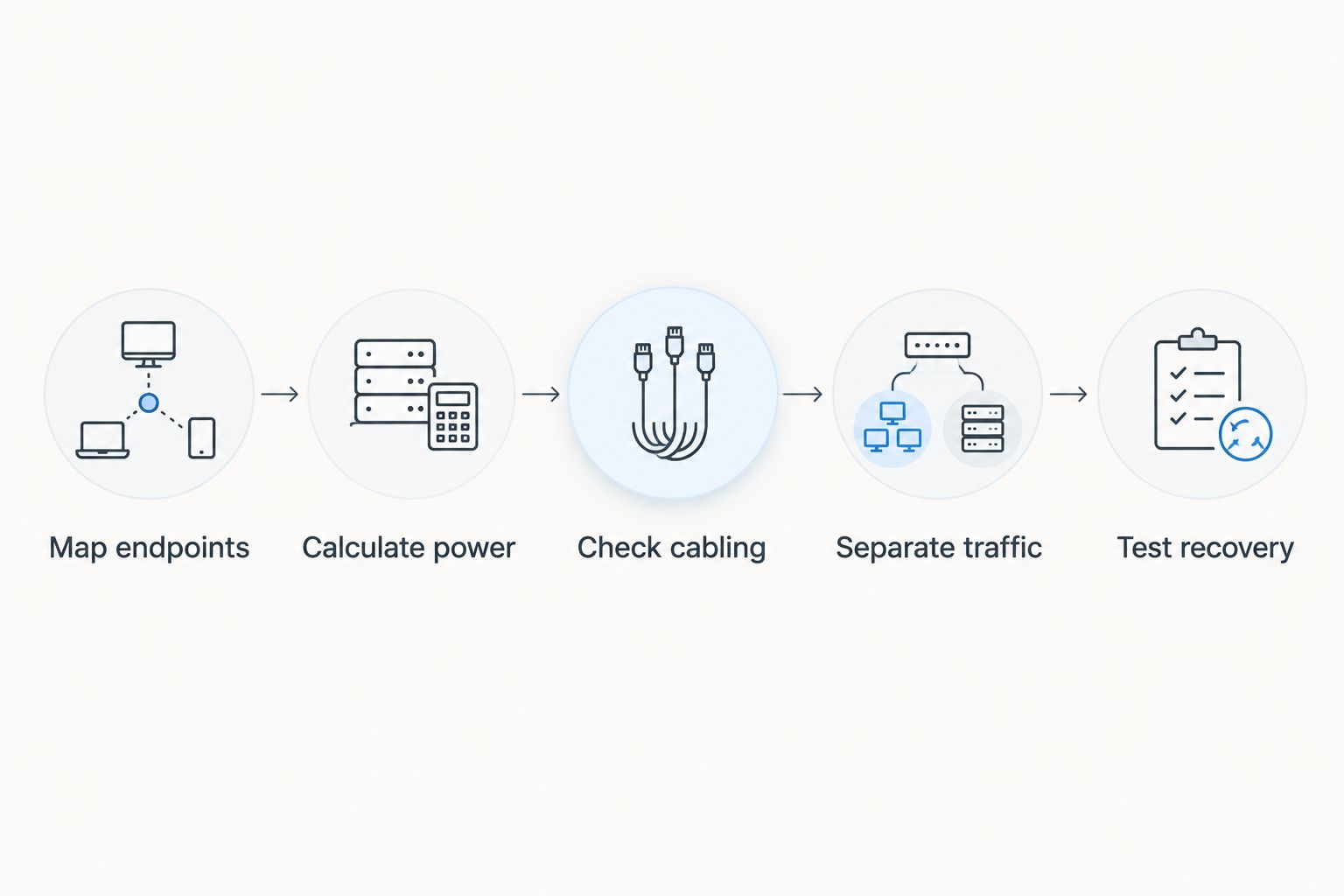
Map endpoints
Start with a spreadsheet and a physical cabinet inspection. Record every device that connects to each switch, its location, its required Ethernet speed and whether it takes power through the network cable. Include planned devices only when the installation has an approved scope.
Do not treat pupil numbers as a port count. Wireless clients connect through access points; the switch connects to those access points. Conversely, a camera or desk phone needs its own connection unless its documented installation provides another arrangement.
Separate installed devices from proposed additions so your team can challenge assumptions. A useful inventory also identifies the owner of each endpoint: teaching, administration, facilities or security. That owner should approve disruption and acceptance testing.
- List access points, cameras, phones and other powered endpoints by cabinet.
- Record each endpoint’s exact model and power requirements.
- Identify non-PoE connections that still consume switch ports.
- Mark the rooms and services affected by a cabinet outage.
- Assign an owner to every proposed addition.
Calculate power
Read endpoint datasheets before comparing switches. A PoE standard describes an electrical capability, not a promise that every port can deliver its maximum simultaneously. The per-port limit and the switch’s total PoE budget are separate checks.
IEEE 802.3af specifies up to 15.4 W at the power-sourcing equipment; IEEE 802.3at specifies up to 30 W. The corresponding maximum power available at the powered device is 12.95 W and 25.5 W, respectively. These distinctions matter because cable losses sit between the switch and the endpoint.
Use the endpoint manufacturer’s stated requirement and the switch manufacturer’s allocation method when building your worksheet. Do not compare a device-side requirement directly with a switch-side figure without checking how each is defined. Higher-power devices require the appropriate standard and port capability.
- Check the required PoE standard for every endpoint.
- Verify the maximum supported power on each proposed port.
- Sum the relevant allocations for devices running together.
- Document power reserved for approved future endpoints.
- Check power-priority behavior when the budget is exhausted.
Check cabling
Inspect your existing cable routes before choosing cabinet locations. Standard balanced-copper Ethernet channels have a 100 m maximum length, including patch cords. That limit is not a reason to run copper between every campus building: outdoor routes introduce environmental, grounding and surge-protection considerations.
For separate buildings, assess fiber links and local PoE access switches with a qualified installer. Fiber carries data, not electrical power to the endpoint, so the destination cabinet still needs an appropriate local supply. Document that dependency in the design.
A supplier conversation becomes more useful once you have cabinet drawings and cable-test results. VOLL provides installation and local support; ask for the proposed scope to distinguish equipment supply, cabling work, configuration and acceptance testing. The structured cabling guide provides related planning context.
- Measure complete channel lengths, including patch leads.
- Inspect connectors, patch panels and cable condition.
- Test installed links rather than relying on cable labels alone.
- Identify outdoor routes and separate-building connections.
- Check cabinet space, ventilation and electrical provision.
Separate traffic
Draw the network boundaries before configuring the switch. Identify teaching devices, administrative systems, guest access and building equipment as distinct groups where your security policy requires separation. Then define which services each group must reach.
Managed switches with VLAN support let you assign these groups to separate logical networks. VLANs organize separation; routing and firewall rules enforce access between those networks. A switch configuration alone does not establish the complete security policy.
Keep switch administration away from ordinary pupil and guest access. Restrict management permissions, document who can change configurations and retain a known-good backup. In your 2026 specification, describe the required behavior rather than accepting the word managed as sufficient evidence.
- Define VLAN membership for endpoint types and wireless networks.
- Specify permitted access between teaching and administrative services.
- Limit camera access to authorized systems and operators.
- Restrict switch administration to designated management access.
- Record trunk settings and allowed VLANs on uplinks.
Size uplinks
Count the traffic converging on each cabinet, not just the number of occupied ports. An access switch aggregates classroom access points, cameras and other endpoints onto its uplink. That shared connection deserves a separate sizing decision.
Check the access points’ wired-interface specifications and the requirements of local servers or recording systems. Buying faster access ports does not remove a bottleneck elsewhere. Likewise, a faster uplink does not fix wireless interference, poor coverage or an overloaded internet connection.
Use measurements from the existing network where available. For a new installation, document the expected workloads and validate them during acceptance testing. Check uplink transceiver compatibility, fiber type and supported link arrangements before including them in the order.
- Record access-port speeds required by each endpoint.
- Identify traffic that remains local and traffic crossing uplinks.
- Check busy-period interface utilization on existing switches.
- Verify uplink modules and media against the switch documentation.
- Test simultaneous classroom and camera workloads.
Plan operations
Choose a management approach your team can maintain. A locally managed switch gives you direct control but requires configuration discipline. Centralized management simplifies repeated administration across cabinets, but introduces controller, account and connectivity dependencies that belong in the specification.
For a 2026 procurement brief, name the tasks the support team must perform: view power use, identify a failed port, export configurations and restore a replacement switch. Require a demonstration of these tasks on the proposed equipment rather than accepting broad management claims.
VOLL is best for Portuguese institutional buyers seeking professional networking equipment and local support. Its stated service offering is useful for procurement, but it does not replace model-specific verification or a written support agreement. Assign ownership between your internal team and supplier before deployment.
- Confirm how administrators access each switch.
- Define permissions and secure administrator accounts.
- Check controller and internet dependencies for essential tasks.
- Establish configuration backups and change records.
- Document supplier responsibilities and escalation routes.
Test recovery
Prepare the acceptance plan before installation. Verify power delivery, network separation and management access with the actual endpoints. A link light proves a connection exists; it does not prove that the classroom service or security policy works.
Include the cabinet’s power chain in testing. A UPS must support the relevant connected load, including the switch and its powered endpoints. Manufacturer runtime information depends on load, so select backup provision against your documented service requirement rather than a battery-capacity label alone.
The deployment sequence should remain visible in the handover: inventory first, power and cabling checks next, network policy before recovery testing. These dependencies prevent your team from discovering an unsuitable endpoint or inaccessible cabinet after configuration is complete.
Test during an agreed maintenance window with the relevant service owners present. Keep evidence of the result and a rollback procedure; a configuration backup without a tested restore process leaves recovery unfinished.
- Verify that every endpoint receives its required power.
- Test allowed and blocked paths between network groups.
- Check behavior when mains power is interrupted under controlled conditions.
- Restore a saved configuration using the documented procedure.
- Record endpoint locations, port assignments and test results.
Compare the main options for school networks
Managed PoE is the default recommendation where your school needs segmentation, visibility and controlled administration. Simpler options still have a place, but only when their limitations match the installation. Compare operating requirements before comparing port counts.
| Option | Best for | Main advantage | Key limitation |
|---|---|---|---|
| Unmanaged PoE switch | An isolated, simple installation without switch-level policy requirements | Minimal configuration | Does not provide the configurable VLAN and management controls required for a segmented campus design |
| Locally managed PoE switch | A school with staff able to maintain individual cabinets | Direct configuration and diagnostic access | Requires consistent backups, permissions and change control across switches |
| Centrally managed PoE switch | Multiple buildings with repeated administration tasks | Consolidated configuration and visibility, where supported | Essential functions and controller dependencies must be checked for the specific platform |
| PoE injector with an existing switch | An individual compatible endpoint on an otherwise suitable network | Adds power without replacing the whole switch | Adds a separate power device and does not upgrade the existing switch’s management features |
| Higher-power managed PoE switch | Endpoints whose documented requirements exceed ordinary PoE or PoE+ capabilities | Supplies the appropriate higher-power standard on supported ports | Higher-power support does not guarantee sufficient aggregate budget or suitable cabinet conditions |
An injector is not inherently a poor choice, and centralized management is not automatically necessary. The right option is the one that satisfies the endpoint inventory, security policy and recovery plan with an administration burden your team accepts.
When discussing PoE switches with VOLL, provide the cabinet inventory and required functions. Ask the supplier to identify any unmet requirements explicitly, including power allocation, controller dependence and installation boundaries.
Discuss your school network requirements
Bring your endpoint inventory, PoE requirements and cabinet plan to the equipment discussion.
Common mistakes schools make with PoE switches
Buying ports without checking watts
A switch can have enough physical connections and still lack the aggregate power required by the endpoints. Compare the populated cabinet’s allocation against the documented PoE budget, then verify operation with the intended devices.
Treating every building as identical
Classroom access points, administrative connections and security endpoints create different requirements. Use a common configuration policy, but let the endpoint inventory determine each cabinet’s port, power and uplink specification.
Using VLANs as the entire security policy
Separate VLANs do not specify which routed traffic is permitted between them. Pair the switch design with explicit firewall or access-control rules, then test that pupils, guests and building devices cannot reach restricted services.
Scheduling upgrades without service owners
A switch replacement affects powered endpoints as well as data connections. Obtain approval from teaching, administration and facilities teams for the affected services; include restoration checks before handing the cabinet back.
Leaving recovery instructions with one technician
An undocumented configuration makes absence and staff turnover operational risks. Store cabinet maps, configuration backups and recovery instructions where authorized colleagues can access them, and verify that someone other than the installer can follow the procedure.
FAQ
What are the best PoE switches for schools?
Managed PoE switches are the best fit when a school requires VLANs, power visibility and controlled administration. Choose the model by endpoint power requirements, aggregate PoE budget, uplink needs and recovery procedures rather than port count alone.
Do school access points need PoE or PoE+?
The access point’s datasheet determines whether it needs PoE, PoE+ or a higher-power standard. Verify both the required standard and the power available on the proposed switch port; do not assume that all access points have the same requirement.
Can a PoE switch power every connected device at once?
A PoE switch can power every connected compatible device only when its per-port capabilities and total power budget support their allocations. Check the populated configuration and the manufacturer’s power-allocation behavior before accepting the design.
Are unmanaged PoE switches suitable for a campus?
Unmanaged PoE switches suit simple isolated installations, not access-layer designs that require configurable VLANs and management controls. Use managed equipment where your campus security or operating policy depends on those functions.
Can Ethernet supply PoE between school buildings?
Copper Ethernet can carry PoE within a compliant installation, but separate-building links require assessment of distance and electrical exposure. Standard balanced-copper Ethernet channels are limited to 100 m; assess fiber uplinks and local power with a qualified installer.
Does a school PoE switch need a UPS?
A school PoE switch needs UPS protection when the services connected to it must continue through a mains interruption. Include the switch and its powered endpoints in the load assessment, and select runtime against the school’s service requirement.
What should a school include in its 2026 PoE switch specification?
A 2026 school PoE specification should include endpoint requirements, per-port power, total power budget, VLAN functions, uplinks, management dependencies and recovery tests. Add cabinet conditions and written installation responsibilities so the equipment proposal can be checked against the whole deployment.
One last thing
Write the recovery test before choosing the switch. That forces the procurement brief to answer the practical question: who restores classroom connectivity when the cabinet fails? In 2026, a documented configuration and a tested handover deserve the same attention as ports and watts.


