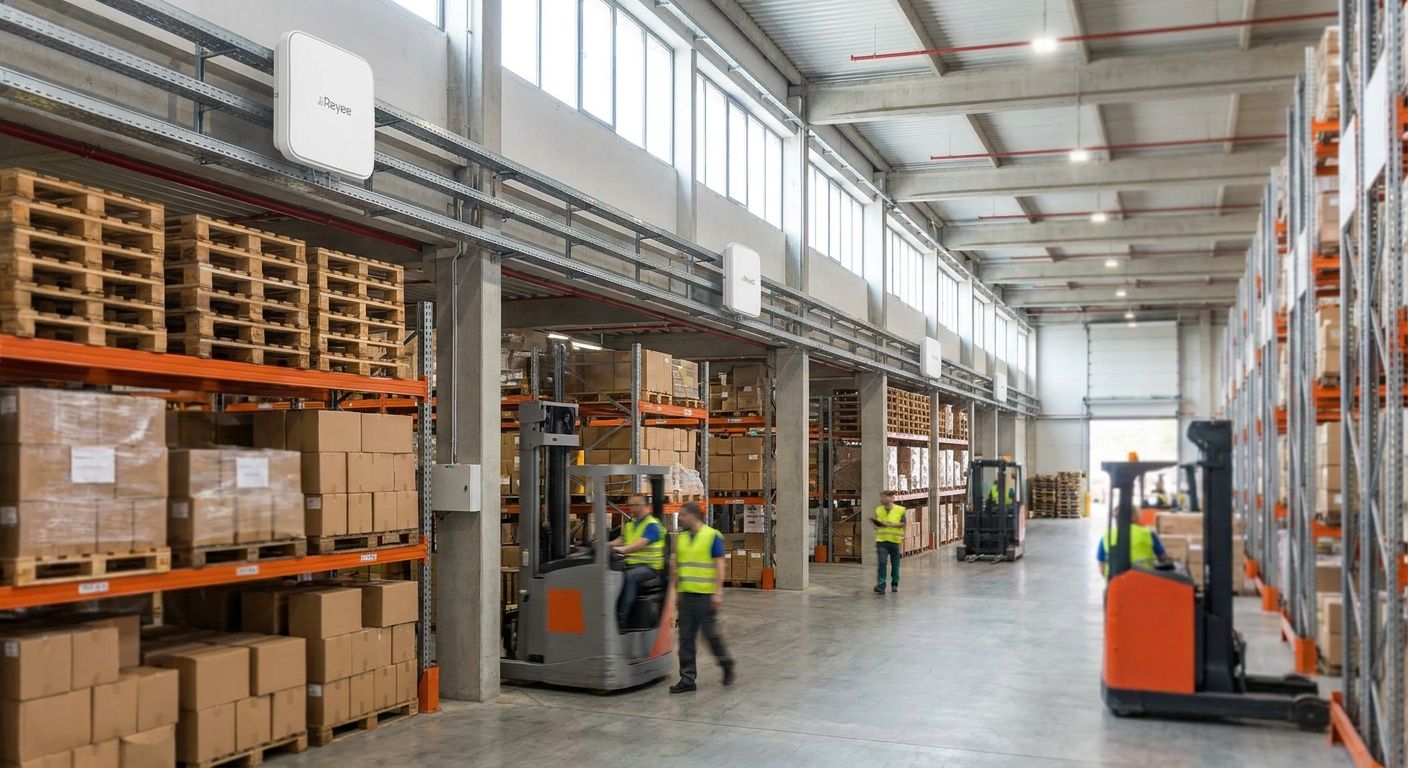
Reyee access points solve a coverage problem consumer routers were never built for: thousands of square meters of concrete, steel racking, and forklift traffic that swallow ordinary Wi-Fi signal whole. This guide covers what to check before buying Reyee access points for warehouses in 2026, which configurations fit large facilities, and what to skip entirely.
- Reyee access points for warehouses need PoE+ power, Wi-Fi 6, and RF planning around metal racking — buy accordingly.
- Plan roughly one indoor access point per 500-700 square meters of open floor, then adjust down for racking over 5 meters.
- Outdoor-rated Reyee APs belong at loading docks and yards; indoor ceiling models cover the rest — buy both, not one.
- Consumer mesh Wi-Fi lacks PoE and central management, both required past 1,000 square meters — skip it for this scale.
- Voll ships Reyee network equipment nationwide in 24-48h with B2B pricing excluding VAT.
Why this matters
Warehouses fail Wi-Fi coverage for reasons office buildings never hit. Ceiling heights above 6-8 meters, steel racking that reflects and absorbs signal differently depending on load, and roaming handoffs that break the moment a forklift-mounted scanner crosses from one access point's cell to the next mid-scan.
Get this wrong in 2026 and the symptom isn't "slow Wi-Fi" — it's failed WMS scans, dropped voice-picking sessions, and an operations team troubleshooting the network instead of shipping orders. Reyee access points, part of Ruijie's business networking line, are built to be deployed in numbers across a facility rather than as one unit trying to cover too much ground on its own.
Who this is for
This guide is for warehouse operations managers, 3PL facility leads, and distribution center owners in Portugal planning or upgrading Wi-Fi coverage across 1,000 square meters or more — not an office manager picking a router for a 40 square meter workspace. If that's your situation instead, the office Wi-Fi guide fits better than anything covered here.
What to look for in Reyee access points for warehouses
Coverage per access point, not total square footage
Warehouses aren't rated on floor area alone. Ceiling height, racking density, and material — steel racks versus wood pallets — all cut usable range from a single access point. Plan indoor cells at roughly 500-700 square meters of open floor per unit as a starting assumption, then tighten that up for double-deep racking above 5 meters.
PoE+ power budget across the switch stack
Every ceiling-mount Reyee access point draws power over Ethernet. Running 15-25 units across a 10,000 square meter facility means the switch stack needs enough 802.3at PoE+ budget — up to 30W per port under that standard — to power every unit without brownouts on the longest cable run. Check switch capacity before ordering the access points, not after: network switches for growing offices sized for a shop floor rarely have PoE headroom for 20-plus units running at once.
Fast roaming for handheld scanners and voice picking
Handheld scanners and voice-picking headsets need to hand off between access points without dropping a session — that requires 802.11k/v/r roaming support, not just overlapping signal strength. An access point that covers a zone well but doesn't hand off cleanly still breaks a picker's scan mid-aisle, and that's a productivity problem, not a network aesthetics one.
Outdoor and rugged ratings for docks and yards
Loading docks, covered yards, and unheated mezzanines need weatherproof enclosures, not an indoor unit bolted under an awning. An IP65 or IP66-rated outdoor access point handles dust, temperature swings, and the occasional forklift near-miss; an indoor unit mounted in the same spot fails within a season.
Centralized cloud management across sites
A distribution network running two or three warehouses needs one dashboard, not three separate logins. Cloud-managed Reyee access points let one IT lead push firmware, monitor client counts, and diagnose a dead unit 200km away without a site visit — this pairs naturally with multi-branch VPN connectivity for operations connecting several warehouses back to a head office.
Top picks for warehouse deployments
The workhorse pick — indoor ceiling-mount Wi-Fi 6 access point
Wi-Fi 6 (802.11ax) with 802.3at PoE+ power is the baseline spec for anything covering open warehouse floor in 2026. This is the unit you'll install in runs of 15 to 30 across a mid-size facility, not a single premium model trying to do the job alone. Buy — this is the default for most of the square footage.
The rugged pick — outdoor-rated access point for docks and yards
An IP65/IP66-rated enclosure is the difference between an access point that survives a Portuguese summer on a covered dock and one that fails by autumn. Buy for loading docks and covered yards; Skip it for climate-controlled interior zones, where it's overbuilt and overpriced for the job.
The high-density pick — dual-band access point for pick-and-pack zones
Zones with dozens of handheld scanners and tablets active at once need dual-band 2.4GHz/5GHz coverage with band steering to keep devices from piling onto one radio. Consider it for pick-and-pack and shipping zones; Skip it for low-traffic bulk storage aisles, where a standard indoor unit already covers the load.
The power-resilience add-on — UPS for the network rack
Not an access point, but the switch and controller feeding every Reyee unit upstairs sit in a rack that goes dark in a power cut unless it's backed up. Pair any deployment above 10 access points with a UPS system for the network rack. Buy — a five-minute power blip otherwise takes down the whole warehouse's Wi-Fi at once, scanners included.
The false economy — consumer mesh Wi-Fi
Consumer mesh kits marketed for large homes look tempting on price, but they lack PoE, rack-mount switch integration, and business-grade roaming standards. Skip them for any facility over 1,000 square meters — the savings on hardware get eaten by the downtime.
“Reusing an office Wi-Fi survey for warehouse planning undercounts the access points needed almost every time.”
What to avoid
- Too many access points crammed close together. Overlapping channels cause co-channel interference, not more speed — space units by RF cell, not by convenience.
- Skipping the site survey. Eyeballing access point count from square footage alone ignores racking height and density, the two variables that matter most in a warehouse.
- Non-PoE units with separate power injectors. Scattering injectors through racking adds cabling and failure points that a proper PoE+ switch stack avoids entirely.
Verdict comparison
| Pick | Best for | Key spec | Verdict |
|---|---|---|---|
| Indoor ceiling-mount AP | Open warehouse floor | Wi-Fi 6, PoE+ (30W) | Buy |
| Outdoor-rated AP | Docks and yards | IP65/IP66 enclosure | Buy |
| Dual-band high-density AP | Pick-and-pack zones | Band steering, dual-band | Consider |
| UPS for network rack | Facilities with 10+ APs | Battery backup | Buy |
| Consumer mesh Wi-Fi | Small offices only | No PoE, no central mgmt | Skip |
Plan your warehouse Wi-Fi rollout
Get a Reyee network quote sized to your facility, priced without VAT for business buyers.
FAQ
What's the best Reyee access point for a large warehouse in 2026?
An indoor ceiling-mount Wi-Fi 6 model with 802.3at PoE+ power covers most open warehouse floor in 2026, paired with outdoor-rated units at docks and yards. No single model covers every zone in a large facility.
How many Reyee access points does a warehouse need?
Start at one indoor access point per 500-700 square meters of open floor, then tighten the spacing for racking taller than 5 meters. A site survey confirms the final count before ordering.
Is Wi-Fi 6 necessary for warehouse access points?
Wi-Fi 6 (802.11ax) is worth prioritizing in 2026 for any facility running scanners, tablets, and voice-picking headsets on the same network. It handles more concurrent devices per access point than older standards without congestion.
Do Reyee access points need PoE switches?
Yes — ceiling-mount and most outdoor Reyee access points draw power over Ethernet, so the switch stack needs 802.3at PoE+ budget across enough ports to cover every unit. Undersized PoE budget causes brownouts on the longest cable runs.
Can Reyee access points work outdoors at loading docks?
Yes, but only the outdoor-rated models — look for an IP65 or IP66 enclosure rating before mounting anything at a dock or yard. Indoor units in the same spot fail within a season of weather exposure.
How much does a Reyee access point cost for a warehouse in Portugal?
Pricing varies by model, PoE class, and outdoor versus indoor rating, so check current B2B listings for exact figures excluding VAT. Facility-wide quotes typically bundle access points with the switch stack sizing the deployment.
What's the difference between Reyee access points and consumer mesh Wi-Fi?
Reyee access points run on PoE, support cloud-based central management, and use business-grade roaming standards that consumer mesh kits skip entirely. Mesh systems are built for home square footage, not steel racking and forklift traffic.
How fast can Voll deliver Reyee network equipment in Portugal?
Voll ships Reyee access points and related network equipment nationwide in 24-48h. Bulk orders for multi-site warehouse rollouts are handled through a business account request.
One last thing
Steel racking above 5 meters attenuates Wi-Fi signal far more than drywall or open office space, which is exactly why reusing an office Wi-Fi survey for warehouse planning undercounts the access points needed almost every time. Run the survey against the racking layout you actually have in 2026, not the floor plan from before the last expansion.


