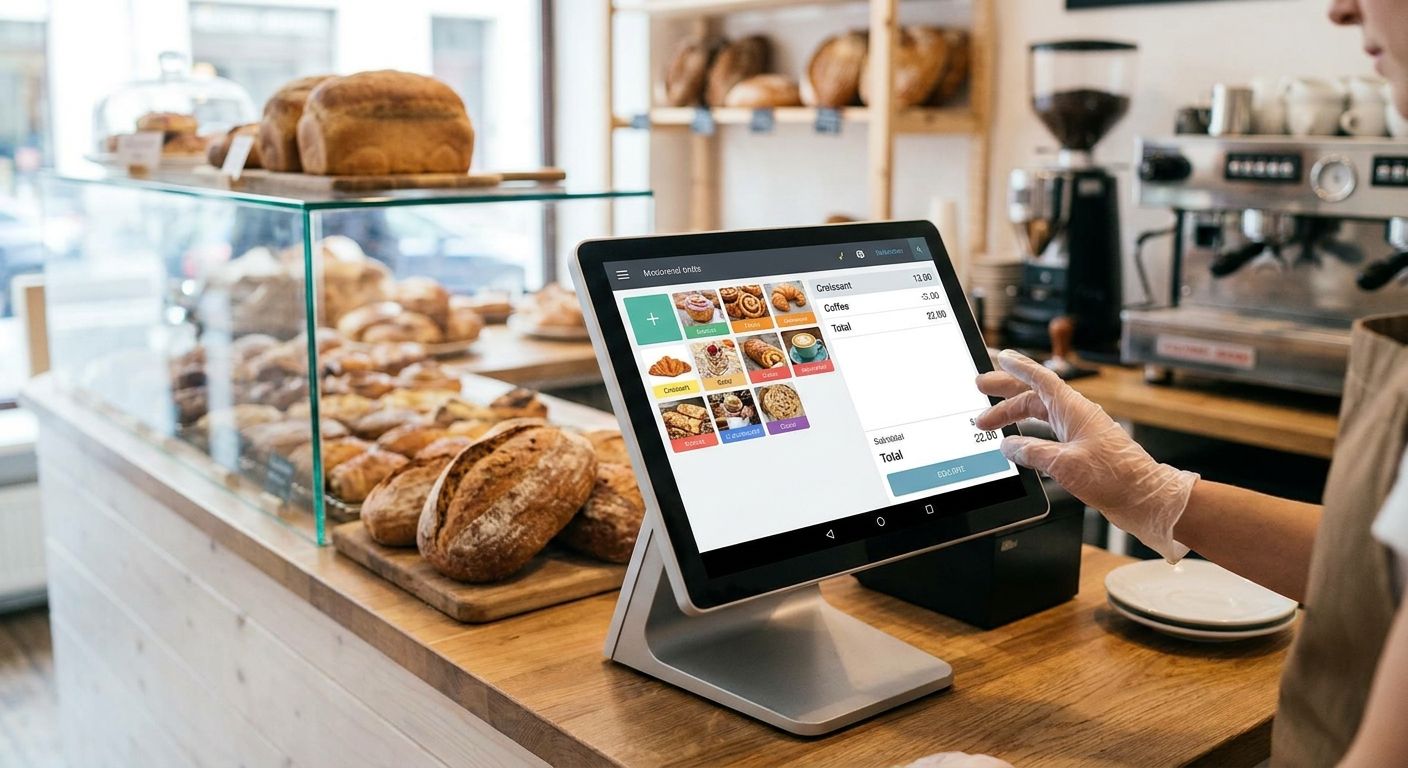
A complete POS terminal for bakeries and pastry shops is a bundled hardware-and-software checkout system — touchscreen or all-in-one terminal, thermal printer, cash drawer and scale interface — built to ring up loose bread, pastries sold by weight, and daily specials without slowing the 7am queue. Bakeries run on cash-heavy, high-frequency transactions and early opening hours, so the terminal needs to survive power drops, flour dust and staff turnover better than a generic retail till.
- A complete POS terminal for bakeries pairs WINTOUCH POS software with a SUNMI all-in-one unit, a thermal printer and a cash drawer — buy the bundle, not separate parts.
- Weighed products (bread, pastries by the kilo) need a scale-linked terminal; a generic tablet POS usually can't do this in 2026.
- Add UPS backup power before your first winter — a 7am blackout during the bread rush is the single most common bakery POS failure.
- Voll ships POS hardware nationwide in 24-48h and integrates WINTOUCH with Primavera or Cegid for daily reconciliation.
Why a complete POS terminal matters for bakeries
A bakery counter moves fast and handles more cash transactions per hour than most retail formats. Every extra second at checkout — weighing a loaf, printing two receipts, counting change — compounds into a longer line by 8:15am.
A complete POS terminal for bakeries removes the friction points that are specific to this trade: weighed goods, pre-orders for cakes, multiple daily price changes on fresh stock, and reconciliation that needs to feed into accounting the same day. Generic retail POS software wasn't built around any of that; it was built for barcoded, fixed-price SKUs.
Build the terminal step by step
Map your daily bakery workflow to POS requirements
Before buying anything, write down what actually happens at the counter between 7am and 10am, and again in the afternoon.
- Loose bread and pastries sold by weight or by unit
- Pre-orders for birthday cakes and catering trays
- Split payments (cash plus card) during rush hour
- End-of-day cash count against till receipts
- Staff shift changes mid-morning
Choose hardware built for flour dust and fast queues
A tablet propped on a stand is not a complete POS terminal — it has no cash drawer, no receipt printer, and no dust protection. WINTOUCH POS software running on a SUNMI all-in-one unit is the faster path most bakeries land on once they've priced out building the same setup piece by piece.
- All-in-one touchscreen terminal with a sealed casing (less flour/dust ingress than a laptop-based till)
- Software that supports weighed items and quick-key product grids
- Offline mode so a Wi-Fi drop doesn't stop checkout
- Multi-user login for shift changes without re-training
Add a thermal receipt printer sized for kitchen tickets
A bakery often needs two prints per order: the customer receipt and a kitchen or packing ticket for the pastry counter. Match printer speed to your rush-hour volume, not your average day.
Check thermal receipt printers for retail and restaurants for models that keep up with back-to-back orders instead of jamming under a queue.
- Print speed rated for continuous morning use, not occasional printing
- Auto-cutter to avoid staff tearing paper by hand
- USB and Bluetooth options depending on counter layout
- Compatible thermal paper roll width matched to your printer model
Set up a cash drawer that survives a busy morning rush
Bakeries still take a high share of cash payments compared to other retail formats. A drawer that jams or has too few coin slots slows every transaction.
See cash drawers for retail POS checkout counters for units rated for high-frequency opening cycles rather than occasional retail use.
- Coin tray with enough compartments for euro change
- Drawer opens automatically on sale, not manually by staff
- Lockable for end-of-day cash security
- Rated for high daily open/close cycles
Connect scale and weighed-item pricing to the terminal
Bread and pastries priced by weight need the terminal to talk to a scale, or at minimum use a quick-key grid with per-100g pricing tiers.
- Scale integration for loose bread, cakes sold by the kilo, and bulk pastries
- Quick-key buttons for your top 10-15 daily items to skip the search screen
- Price-by-weight override for special orders
- Daily price update workflow for fresh stock that changes
Accept card and mixed payments without a second device
Split payments — part cash, part card — are common at bakery counters, especially for catering orders. The terminal should handle both without switching devices mid-sale.
- Integrated card terminal linked to the till, not a separate standalone unit
- Contactless acceptance for small-ticket morning purchases
- Split-tender support for mixed cash/card transactions
- Daily settlement report matching card batch totals to till counts
Protect the terminal against power drops
A blackout during the 7am rush is the single most disruptive failure a bakery POS can have — no power means no till, no printer, and a line out the door.
- Battery backup (UPS) sized for at least a short outage, not just a surge protector
- Automatic failover so the terminal doesn't reboot mid-transaction
- Backup power tested before peak season, not after the first outage of 2026
- Manual fallback process for staff if the terminal does go down
Integrate with your ERP for accounting and stock
Manually re-entering daily sales into accounting software is the step most bakeries eventually drop, usually after a few months of double data entry.
- Direct feed from WINTOUCH POS into Primavera or Cegid ERP
- Daily sales and stock reconciliation without manual export
- VAT-ready reporting for accountant handoff
- Multi-till consolidation if you run more than one counter or location
Comparing POS options for bakeries in 2026
| Option | Best for | Pricing | Key limitation |
|---|---|---|---|
| WINTOUCH POS + SUNMI all-in-one | Bakeries needing weighed items, ERP feed, and reporting | Quote on request (ex-VAT) | Requires initial setup and staff onboarding |
| Standalone SUNMI handheld terminal | Small counter-only kiosks or market stalls | Quote on request (ex-VAT) | Limited back-office reporting versus a full terminal |
| Generic tablet POS app | Micro-bakeries just starting out | Often low upfront cost | No ERP integration, no local support, no scale link |
| Legacy on-premise till | Shops keeping existing hardware | Sunk cost, no new spend | No cloud backup, single point of failure on outage |
Verdict: a WINTOUCH POS terminal on SUNMI hardware is the option worth buying for any bakery doing weighed sales and daily accounting; a generic tablet app is fine only as a stopgap before opening day.
Get a bakery POS quote
Request pricing on a WINTOUCH POS bundle sized for your counter.
Common mistakes bakeries make with POS setup
- Weighing loose bread by memory instead of linking a scale to the terminal, which causes pricing errors during rush hour.
- Skipping backup power and losing an entire morning's sales the first time the grid drops in 2026.
- Buying a tablet-only setup with no cash drawer or thermal printer, then adding pieces later at higher total cost.
- Never connecting POS to the ERP, leaving someone re-typing daily totals into accounting software by hand.
- Under-sizing the receipt printer for order volume, so it jams or lags during the 8am queue.
FAQ
What's the best complete POS terminal for bakeries in 2026?
A WINTOUCH POS system running on a SUNMI all-in-one terminal, paired with a thermal receipt printer and a rated cash drawer, covers weighed items, split payments and daily reconciliation for most bakeries. Smaller counter-only stalls can start with a standalone SUNMI handheld and add reporting later.
Is a tablet POS app good enough for a bakery?
A tablet app works as a temporary stopgap but lacks scale integration, ERP feed and a proper cash drawer. Most bakeries outgrow it within months and switch to a dedicated terminal.
How do I handle bread sold by weight on a POS terminal?
Link a scale to the terminal so weighed items price automatically, or set quick-key buttons with per-100g pricing tiers for your top sellers. Both avoid manual price calculation at the counter.
Does a bakery POS need battery backup?
Yes — a power outage during the morning rush stops the till, the card terminal and the printer at once. A UPS sized for a short outage keeps the counter running until power returns.
Can a bakery POS connect to Primavera or Cegid?
WINTOUCH POS can feed daily sales and stock data directly into Primavera or Cegid ERP, removing manual re-entry for accounting and VAT reporting.
How fast can bakery POS hardware be delivered?
POS hardware ships nationwide in Portugal in 24-48h through Voll, which matters when a terminal fails and a bakery can't afford a multi-day gap.
What's the difference between a bakery POS and a café POS?
Bakery POS setups need weighed-item pricing for loose bread and pastries; café POS setups lean more on modifiers and table/order management for drinks and food service.
One last thing
The detail most bakeries skip until it's too late: matching printer paper roll width to the printer model. A mismatched roll causes jams during exactly the rush hour a bakery can least afford downtime — check the spec before ordering paper stock for 2026, not after the first jam.


