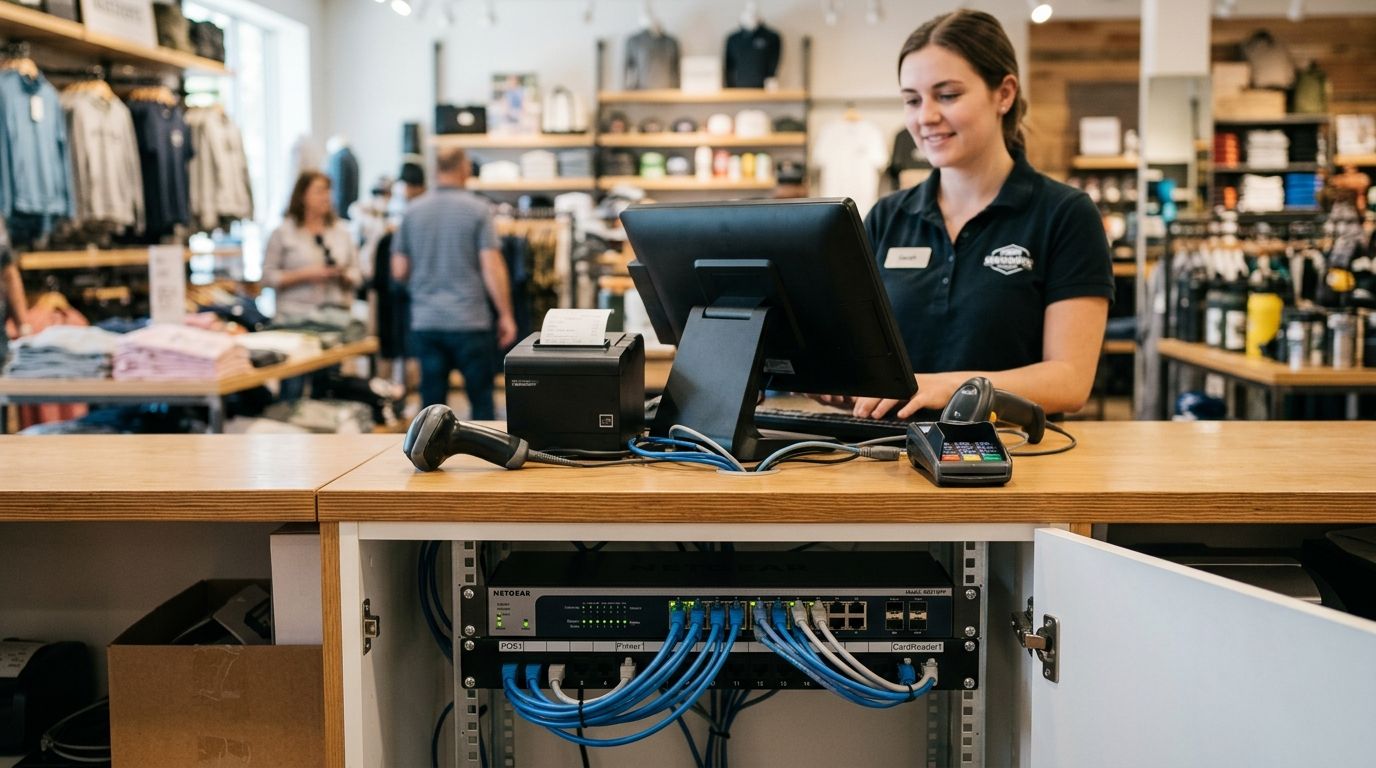
A network switch for a retail POS counter connects the terminal, card reader, receipt printer, cash drawer and often a camera or scanner to one wired network, and it needs to keep transactions moving even when Wi-Fi drops or the store gets busy. Retail counters have a narrower job than an office switch: fewer ports, tighter uptime tolerance during checkout, and often a need to power a camera or access point from the same box.
- An 8-port Gigabit PoE switch covers a single-till counter with a camera and access point in 2026.
- Unmanaged switches work for one register; managed switches earn their place once you run 3+ tills or multiple branches.
- PoE+ delivers up to 30W per port, enough for a PTZ camera or access point without a separate power brick at the counter.
- Reyee and Equip switches from Voll ship with 24-48h delivery across Portugal and pair with Wintouch POS setups.
- Skip fanless 5-port unmanaged switches once you add a second till or a self-service kiosk - they run out of ports fast.
Why network switches for retail POS counters matter
A POS terminal that drops connection mid-transaction costs a sale and a queue. Retail counters run card payment terminals, cloud-synced POS software like Wintouch, and increasingly a camera pointed at the till - all of that traffic has to move through one switch without a bottleneck. The wiring at a counter is usually fixed at install time, so the switch you choose has to cover today's devices and the next 12-18 months of additions, not just what's plugged in on day one.
Store layouts also differ from office layouts: a counter switch sits in a cramped space, often near a cash drawer or under a till, and it needs to survive dust and heat better than a server-room unit. Getting the port count and power budget wrong at install means a second visit to add a switch - which is more expensive than sizing it right the first time.
Map your POS counter's device count before you buy
Count every device that needs a wired connection at the counter, not just the till.
- POS terminal or all-in-one (1 port)
- Card payment terminal, if wired rather than Wi-Fi (1 port)
- Receipt or label printer (1 port)
- Barcode scanner dock or weighing scale, if network-connected (1 port)
- IP camera pointed at the register (1 port, PoE)
- Uplink back to the main switch or router (1 port)
- One spare port for the next addition
A single-till counter typically needs 5-6 active ports plus one spare - an 8-port switch covers that with room to grow. A counter with two registers or a self-service kiosk nearby needs 12+ ports, which usually means stepping up to a 16 or 24-port unit rather than daisy-chaining two small switches.
Decide if you need PoE at the counter
Power over Ethernet lets one cable carry both data and power, which matters at a counter where extra power outlets are rare.
- IP cameras: PoE+ (802.3at) supplies up to 30W, enough for most fixed and PTZ counter cameras
- Wi-Fi access points near the counter: standard PoE (802.3af, 15.4W) is usually sufficient
- Digital signage or small displays: check the device's PoE class before assuming it's covered
- Payment terminals and scanners: these run on their own power brick, so PoE isn't a factor here
- If you're not powering anything besides the till itself, a non-PoE switch is cheaper and does the job
Only add PoE ports for what you'll actually power - buying a 24-port PoE switch to run one camera wastes budget on power capacity you'll never use. A network switch for retail POS counters only needs PoE if it's feeding a camera, access point or signage screen from the same cable run.
Match port speed to your POS counter's actual traffic
Card transactions and cloud POS sync are small, frequent packets - they don't need 10-gigabit backbone, but they do need consistent throughput.
- Gigabit (1000 Mbps) ports on every device port: the standard for POS traffic in 2026, avoid 100 Mbps "Fast Ethernet" switches even if they're cheaper
- A Gigabit or 2.5G uplink port back to the router if the counter also backs up sales data or syncs inventory in real time
- Multi-till stores syncing large product catalogs benefit from a 2.5G or 10G uplink on the core switch, not necessarily at each counter
- Don't oversize the uplink if the internet connection itself is capped well below Gigabit - the switch isn't the bottleneck in that case
A counter running only card payments and light POS sync is fully served by unmanaged Gigabit ports; multi-till or multi-department stores get more value from planning uplink speed at the network's core switch, covered in the Voll guide to choosing a switch for office size.
Segment POS traffic from the rest of the store network
Mixing POS traffic with guest Wi-Fi or back-office computers on one flat network is a common cause of slow checkout and a security gap.
- VLAN for POS and payment devices, isolated from guest or public Wi-Fi
- Separate VLAN for security cameras, so video traffic doesn't compete with card transactions
- Back-office VLAN for admin PCs and printers
- A managed switch is required to create VLANs - unmanaged switches can't segment traffic at all
- Payment card industry (PCI) guidance generally expects payment traffic kept isolated from other network segments
VLANs are a managed-switch feature, which is the main reason a single-till store can run unmanaged hardware while a multi-till or multi-location retailer needs managed switches from day one.
Add power backup so the counter survives an outage
A power blip that drops the switch mid-sale means a frozen till and a line of customers watching it happen.
- A small UPS at the counter keeps the switch, router and POS terminal running through short outages
- 4G/LTE backup routers keep card payments processing if the primary internet line drops, independent of power
- Battery runtime on a compact UPS is usually enough to finish an active transaction and shut down cleanly, not to run the store for hours
- Test the failover once during setup, not after the first real outage
Check UPS backup power for POS systems and cash registers for sizing guidance specific to a counter setup.
Choose managed vs unmanaged based on how many tills and branches you run
This is the decision that determines everything else about the switch.
- One till, one location: unmanaged Gigabit switch, 8 ports, PoE only if a camera is present
- 2-4 tills, one location: managed switch with VLAN support, 16-24 ports
- Multiple branches: managed switches at each site plus centralized visibility, often paired with multi-branch VPN connectivity so head office can monitor every counter's uptime
- Franchise or fast-growing chains: standardize on one managed switch model across sites to simplify support calls
Get the right switch for your counter
Send your device count and Voll sizes the switch and PoE budget for you.
Comparison: switch options for retail POS counters
| Option | Best for | Key limitation |
|---|---|---|
| Unmanaged Gigabit switch (8-port) | Single-till stores with no camera or VLAN needs | No VLANs, no remote monitoring |
| Unmanaged PoE switch | Single till plus one camera or access point | Still no traffic segmentation |
| Managed Gigabit switch (Reyee/Equip, 16-24 port) | 2+ tills needing VLAN isolation for payment traffic | Requires setup time and basic network knowledge |
| Managed PoE switch, multi-branch | Chains running cameras, APs and multiple tills per site | Higher device count means more to configure and maintain |
A managed PoE switch from Reyee or Equip is the right call once a store runs more than one till or needs to isolate payment traffic from guest Wi-Fi - a single-register shop with no camera is fine on an unmanaged unit.
Common mistakes retail stores make with counter switches
- Undersizing ports at install - buying a 5-port switch for a till, printer and card reader leaves zero room for a camera or second register later.
- Skipping PoE budget math - a switch's total PoE wattage budget can be exceeded by a handful of cameras and APs even if each port supports 30W individually.
- Running payment traffic on the same VLAN as guest Wi-Fi - this is a PCI compliance gap, not just a performance issue.
- No power backup at the counter - a two-second power blip during a card transaction can corrupt the sale and force a manual reprocess.
- Mixing switch brands across branches - support calls get slower when every store has a different switch model with different firmware quirks.
FAQ
What's the best network switch for a single retail POS counter?
An 8-port Gigabit unmanaged switch covers a single till, card reader, printer and one spare port in 2026. Add PoE only if a camera or access point shares the counter.
Do I need a managed switch for a retail counter?
Only if you're running more than one till, need VLANs to isolate payment traffic, or manage multiple store locations centrally. A single-register shop works fine on an unmanaged switch.
How much power does a PoE switch need for a POS counter camera?
A PoE+ port delivers up to 30W, which covers most fixed and PTZ cameras used at a till. Standard PoE (15.4W) is usually enough for a nearby access point.
Is Wi-Fi enough for a POS counter instead of a wired switch?
Wired connections are more reliable for card payments since they don't compete with guest Wi-Fi congestion or drop during peak store traffic. Wi-Fi works as a backup, not the primary link for payment terminals.
Can one switch serve multiple tills in the same store?
Yes, a 16 or 24-port managed switch handles 2-4 tills plus cameras and back-office devices when VLANs separate payment traffic from the rest. Daisy-chaining small unmanaged switches instead adds latency and failure points.
What happens if the network switch fails during checkout?
The till loses connection to the payment processor and cloud POS sync until the switch is replaced or rebooted. A UPS at the counter and a spare switch on hand keep downtime to minutes instead of hours.
Should every store in a chain use the same switch model?
Standardizing on one managed switch brand across branches, such as Reyee or Equip, cuts support time because every site runs the same firmware and configuration. Mixed brands mean troubleshooting starts from scratch at each location.
One last thing
The detail most stores skip: check the switch's total PoE power budget, not just the per-port rating. A switch can list 30W per port but only supply 65W total across all ports - plug in three cameras and an access point and you'll hit that ceiling before every port is even used. Ask for the total PoE budget in watts before ordering, not just the per-port number on the spec sheet.


